
A package arrives. You start typing the recipient's name into your tracking system. The phone rings. Someone at the front desk needs a package right away. You lose your place and start over.
This happens dozens of times a day. Between manual data entry, interruptions, and questions about missing packages, receiving becomes one of the most time-consuming parts of mailroom work.
OCR technology promises to fix this problem by reading shipping labels automatically. Many mailroom teams have heard that promise before and been let down. Early versions didn't work well in real conditions and created more work than they saved.
What's different today is not OCR itself. It's how OCR is trained, used, and built into the receiving process.
What OCR Actually Does
OCR stands for optical character recognition. In a mailroom, it works as an automation tool for intake data. Instead of staff manually typing information from shipping labels into a tracking system, OCR converts printed text into structured data that software can process automatically.
This matters because the system does more than just take pictures. A scan creates a visual record, then software extracts information from it, including printed text and encoded data like tracking numbers, to identify details such as the recipient and carrier. When done right, OCR removes one of the most time-consuming and error-prone steps in package receiving.
OCR is widely used across industries to convert printed or handwritten text into machine-readable data, a foundation that underpins modern document processing and logistics workflows.
How OCR Works During Package Receiving
OCR works best in a mailroom when it's built into the receiving process, not added on as an extra step. The key is capturing accurate information right when packages arrive, before they get sorted or delivered.
When OCR is part of your intake workflow, here's how it works:
Step 1: Capture the Label Image
A package label is scanned using a mobile device. The image is captured instantly during receiving.
Step 2: Identify Text Regions
The software detects where text exists on the label and separates it into logical sections such as recipient, address, carrier, and tracking number.
Step 3: Recognize Characters
Letters and numbers are analyzed and converted into machine-readable text.
Step 4: Extract Relevant Fields
The system identifies which pieces of information matter for mailroom operations and assigns them to the correct fields.
Step 5: Sync Data to the Receiving System
The captured data flows directly into the mailroom workflow, ready for review and routing.
This workflow matters because it establishes accuracy at intake, rather than relying on corrections later in the process.
Why Earlier OCR Systems Struggled in Mailrooms
Mailrooms aren't neat and organized spaces. Labels show up in all kinds of conditions—damaged from shipping, printed poorly, or hard to read in bad lighting. These everyday realities made older OCR systems unreliable.
Early OCR was built for clean office documents, not shipping labels handled in busy receiving areas. These systems needed everything to look perfect and follow exact formats. Even small problems with how a label was printed would cause errors, forcing staff to fix the data manually.
This mismatch between what OCR needed and what mailrooms actually deal with is why many teams gave up on it years ago and went back to typing everything by hand.

How AI Changed OCR Performance
The turning point for OCR in mailrooms came from artificial intelligence, not minor improvements to character recognition alone. AI changed how systems interpret labels by focusing on patterns and context rather than fixed templates. Modern OCR systems rely on machine learning models rather than fixed rules, allowing them to adapt to variation in formats, quality, and context, a shift that has driven major accuracy improvements.
AI-powered OCR is trained on thousands of real shipping labels across carriers, layouts, and conditions. Instead of expecting labels to conform to a predefined structure, the system learns how information is typically organized and adapts when that structure changes.
This enables modern OCR to function reliably in active receiving environments where variability is the norm.
- Higher accuracy with imperfect labels, using context to infer missing or unclear characters.
- Automatic recognition of carrier formats, including FedEx, UPS, USPS, and DHL.
- Smarter field extraction, prioritizing recipient names, tracking numbers, and delivery details.
- Continuous improvement, as the system learns from every label processed.
Understanding OCR Accuracy in Simple Terms
OCR accuracy is often shown as a percentage, but that number alone doesn't tell you much. What really matters for mailroom teams is whether OCR actually saves time or just creates more work fixing mistakes.
There are two ways to measure accuracy. One way counts how many individual letters or numbers are read correctly. But even if most letters are right, you can still end up with errors that make the information unusable.
The more important measure is whether complete pieces of information are captured correctly, like getting the entire tracking number or the full recipient name right. This is what actually matters when you're running a mailroom.
For OCR to be useful in real mailroom conditions, it needs to get complete information right at least 95 percent of the time. If it's less accurate than that, your staff will spend more time fixing errors than they would have spent just typing everything in the first place.
Where OCR Creates the Most Operational Value
OCR is helpful in most mailrooms, but it makes the biggest difference when manual data entry slows things down, causes mistakes, or creates risk. In some situations, the time you save and the accuracy you gain add up quickly.
OCR delivers the biggest gains when:
- Package volumes are high, and every saved second adds up across the day.
- Multiple carriers arrive together, creating format variability.
- Leadership expects reporting, audit trails, or defensible chain of custody records.
- Complaint volume is high, often driven by intake errors.
- Staff turnover occurs, requiring faster onboarding with minimal training.
In these environments, OCR shifts from a convenience to a necessity.
What to Look for in Mailroom OCR Technology
Not all OCR tools are built for mailroom work. Many were made for office documents and don't hold up in busy receiving areas.
When choosing OCR for your mailroom, focus less on what the technology claims to do and more on whether it actually fits into your daily work—receiving, sorting, and routing packages.
- Mobile-first capture, so scanning happens where packages arrive.
- Fast processing speed, preventing intake bottlenecks.
- Direct integration, ensuring data flows automatically into mailroom workflows.
- A review step, allowing staff to confirm accuracy before finalizing records.
- Testing with real labels, not idealized demo samples.
If OCR does not fit naturally into receiving, teams will bypass it.
Common OCR Misconceptions
OCR has been talked about in facility management for years, usually with big promises that didn't pan out. That's left a lot of people skeptical. But it's also made things clearer: what matters isn't whether OCR can read text—it's whether it actually works in the messy, real-world conditions mailroom teams deal with every day.
A few myths still hang around. Knowing where they fall apart helps you figure out if OCR is right for your operation.
Myth #1: OCR replaces staff.
OCR removes manual data entry. Staff still manage receiving, sorting, delivery, and service.
Myth #2: OCR requires perfect labels.
Modern AI-powered OCR is designed for real-world wear, lighting, and angles.
Myth #3: OCR is only for large mailrooms.
Value scales with volume, but many teams see returns well below enterprise throughput.
Myth #4: OCR takes months to implement.
Mailroom-focused solutions typically deploy in days or weeks.
The Real Impact on Daily Operations
When OCR is implemented correctly, the impact extends beyond faster intake. Accurate data at the start of the package lifecycle improves everything downstream.
- Higher throughput without adding headcount.
- Fewer interruptions from missing or misrouted packages.
- Cleaner reporting when leadership asks questions.
- Fewer lost package disputes backed by defensible records.
- Faster onboarding for new staff.
These outcomes stem from better data captured at the moment of receipt.
How the LogisticsOS AI Receiving Assistant Applies OCR
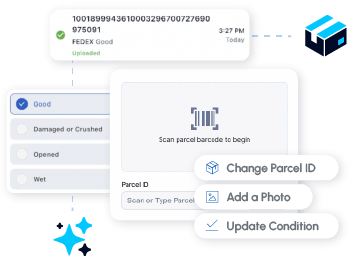
OCR delivers its full value only when it is embedded into a broader receiving workflow. Standalone tools often capture data but fail to support verification, routing, or accountability.
The LogisticsOS AI Receiving Assistant applies OCR as part of an end-to-end intake process powered by Beacon AI, the artificial intelligence engine built into FacilityOS. Using the Smart Scanner app, staff scan parcels during receiving. The app captures the label image automatically, and Beacon AI extracts recipient information, tracking numbers, and carrier details using OCR.
That data flows directly into the web-based Smart Processing screen, where teams review, confirm, and route parcels with full visibility. This approach combines mobile speed with web-based accuracy and maintains a complete digital audit trail across the receiving workflow.
The result is faster intake, fewer errors, and cleaner data from the moment packages enter the building.
If you want to see how OCR performs with your actual labels, bring a few samples to a demo. Scanning real packages is the fastest way to evaluate fit.
Stay updated with industry insights, success stories, and more. Follow us on social media for the latest FacilityOS content.
 Follow us on Facebook
  Follow us on X
 Follow us on LinkedIn