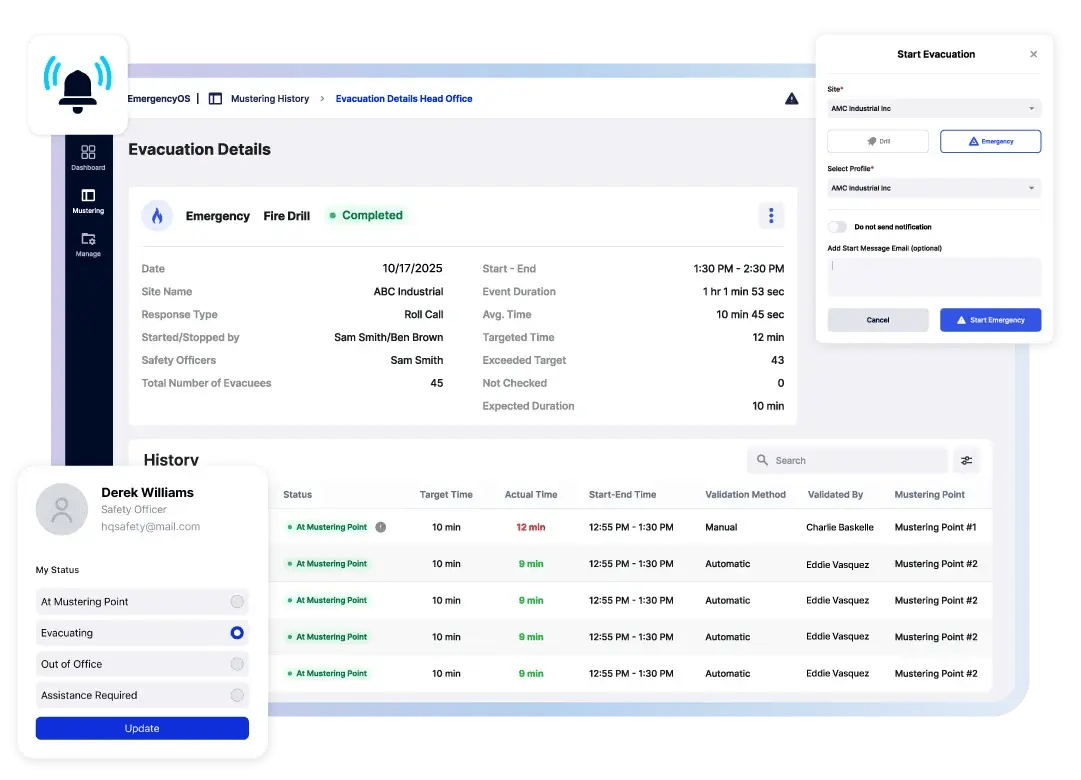





















Efficiency Through Digitization
Digitize Emergency Management at all Stages of Evacuation
Streamline Emergency Preparedness
Automate and optimize your emergency and evacuation processes by digitizing notifications, alerts, evacuations, and reporting. This reduces reliance on manual, labor-intensive practices, allowing you to respond faster and more effectively during emergencies.
Enhance Safety & Compliance
Customize your emergency response with precision, improve visibility, and have access to all evacuation data centralized on a dashboard for analysis and reporting. By providing digital oversight of the evacuation process, EmergencyOS serves as your source of truth for the status of evacuees.

Account for Everyone On-Site
Ensure Safety with Real-Time Accountability
Real-Time Visibility
Access a live digital list of all employees, visitors, contractors, and other temporary guests present during emergency events, helping to ensure that everyone is accounted for in an emergency. This real-time data increases visibility and allows for quicker response times in critical situations.
Extend Communication
Include visitors and contractors in communication channels to ensure they receive critical updates and are informed during emergencies.

Reporting, Compliance & Ongoing Optimizations
Instant Access to Evacuation Data and Insights
Simplified Reporting and Compliance
Digital audit trails streamline the reporting process for both internal and regulatory needs. Easily collect, store, and access evacuation data, simplifying the reporting of evacuation performance to meet compliance requirements.
Optimize Evacuation Performance
Monitor evacuation performance metrics at both the facility and individual levels, leveraging real-time and historical data to refine procedures and inform improvements. This helps optimize evacuation processes, ensuring quicker return-to-work times and boosting productivity for the organization.

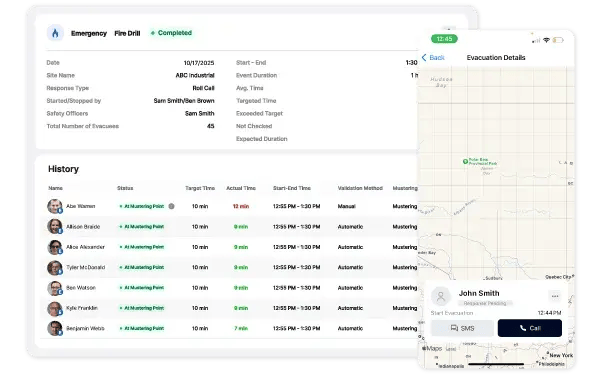
Digitize Evacuation Processes
Say goodbye to inefficient manual evacuation processes. With digital oversight of the evacuation and mustering process, EmergencyOS helps to remove the manual effort of error-prone, paper-based processes and decreases costly downtime.
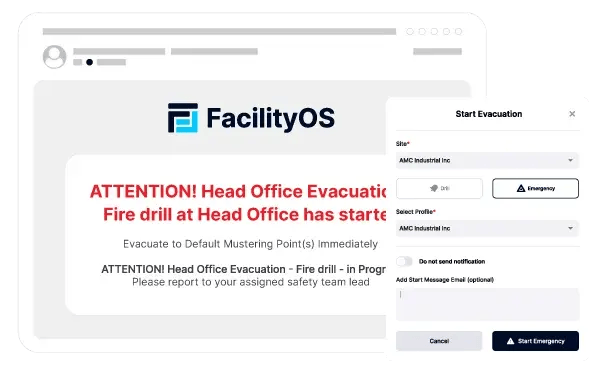
Extend Communication
Remove communication barriers for non-employees. Integration with Visitor Management Systems, such as FacilityOS's VisitorOS, allows temporary visitors and contractors to be included in real-time communication channels and critical updates.
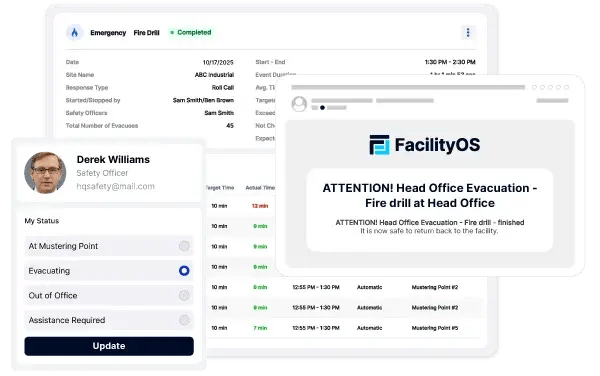
Communicate in Real-Time
EmergencyOS active messaging features allow Safety Officers to communicate instantly with all evacuees during an emergency via standard SMS and phone calls within the app.
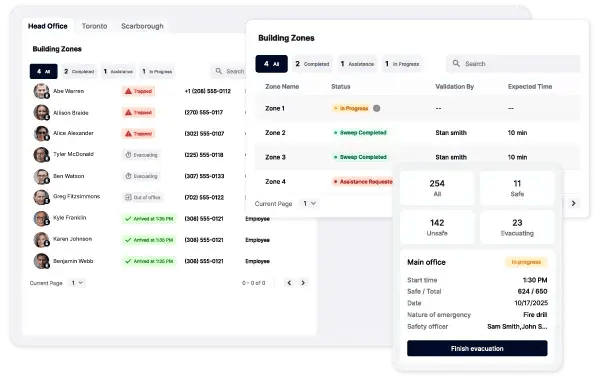
Gain Real-Time Visibility
EmergencyOS provides Safety Officers access to an up-to-date list of employees, including visitors and contractors potentially impacted by an emergency evacuation situation – all visible in a centralized interface.
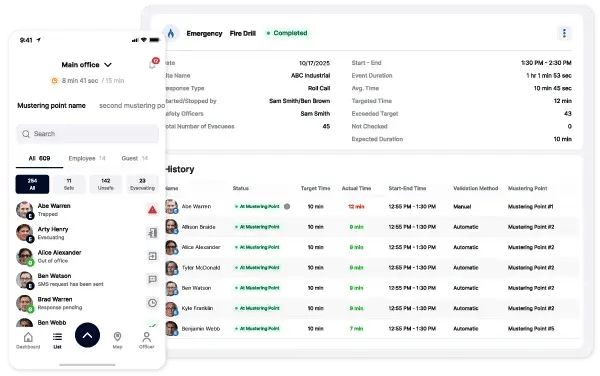
Perform Digital Roll Calls
Manual paper-based roll calls are time-consuming and often incomplete. With EmergencyOS, Safety Officers can save valuable time with digital roll calls. The latest status from all evacuees is automatically gathered. Have multiple mustering points? No problem! The data is stored in a remotely accessible central location.
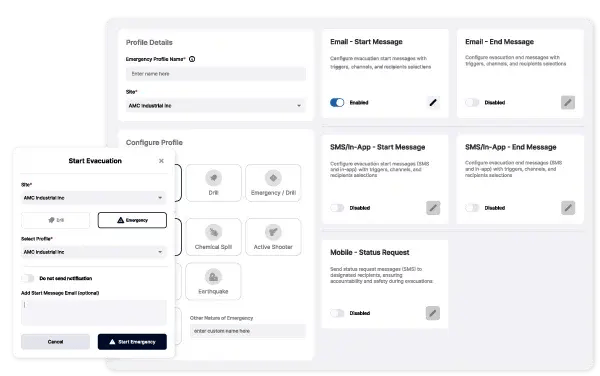
Tailor Emergency Responses
EmergencyOS lets you create and customize procedures and notifications for various emergency scenarios with precision. Configure response flows, tailor your messages, and ensure timely communication during the most critical moments.
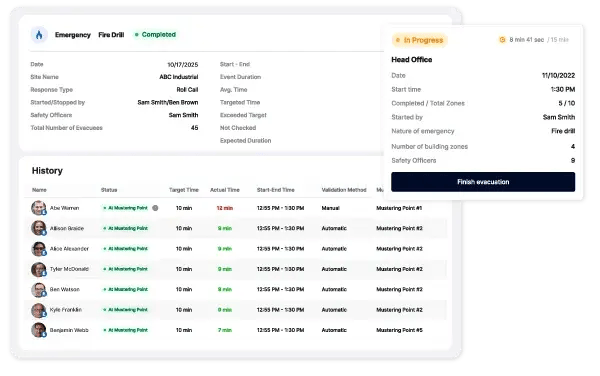
Evacuation Reporting
Collect and store evacuation data such as the nature of the event, emergency event duration, individual evacuation times, and more. EmergencyOS provides a digital record of evacuation events along with complied detailed evacuation metrics for all facilities providing company-wide visibility across your entire enterprise.
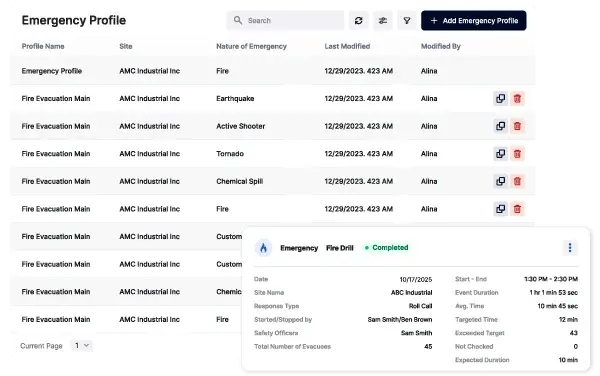
Compliance Reporting
EmergencyOS allows you to maintain detailed reports essential for internal and external audits and regulatory compliance by recording a full and complete digital audit trail and evacuation log of every evacuation event. Save time, improve accuracy, and avoid penalties and costly audits.
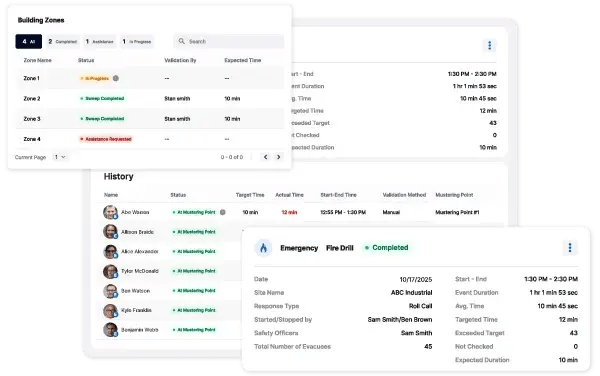
Data Driven Improvements
EmergencyOS provides you with the data needed to help detect and isolate potential future issues and identify actionable opportunities to implement ongoing evacuation process improvements. Leverage historical evacuation data to track trends over time, quickly identify points of friction, and highlight areas of weakness.


Step 1
Administrators configure emergency profiles and customize mobile/email messaging for each from within EmergencyOS. This ensures that all visitors and employees are best prepared when an emergency event is triggered.

Step 2
An emergency event is initiated from the EmergencyOS portal, on-site from a sign-in kiosk, or from the mobile app.
Step 3
Alerts are sent to participants detailing emergency procedures based on predefined emergency profiles. Since EmergencyOS can integrate with existing address books and mass notification systems, it automatically collects visitor data enabling Safety Officers and administrators to communicate with all on-site personnel and visitors in real-time. If enabled, a list of signed-in visitors is automatically sent to hosts.
Step 4
For roll call scenarios, evacuees make their way to the designated mustering point where Safety Officers perform digital roll calls. Participants latest status information is automatically collected and recorded in one centralized, remotely accessible location. For building sweep scenarios, Safety Officers will see a list of zones or areas of your facility to be swept. Safety Officers mark zones as safe in the mobile app confirming the area has been evacuated. Filters automatically prioritize the mustering list based on user status, focusing Safety Officers' attention to personnel who are unaccounted for, have not provided a current status or need help during the evacuation.
Step 5
Once safe, Safety Officers can complete the evacuation. The customizable mobile/email messaging tools configured in the Emergency Profile aid in guiding evacuees back to the workplace, reducing downtime caused by drills and emergencies.
Step 6
With a full digital audit trail of each drill and evacuation, effortlessly report on emergency events and analyze detailed metrics for continuous improvement.

Employees
Employees gain confidence in their safety through prompt and precise emergency alerts and instructions for mustering.

EHS Professionals
EHS professionals can efficiently manage and document all aspects of an emergency response, from initial alerts to reporting, ensuring compliance with regulations.

Facility Managers
Facility managers can effectively oversee the safety protocols, manage the evacuation process, and ensure the facility is cleared.

Company Executives
Executives receive comprehensive reports post-incident, which aids in risk management.






Effortless Setup and Comprehensive Contractor Management
I really like the dashboard and reports that FacilityOS ...
Effortless Setup and Comprehensive Contractor Management
I really like the dashboard and reports that FacilityOS offers, especially because we use the report to create my monthly report about how many hours my contractors spend on site. The initial setup of FacilityOS was super easy for me, which I really liked.
Julio G.

Intuitive, easy to use
We rolled out 90 locations quickly in about 3 months with the help of FacilityOS's sup...
Intuitive, easy to use
We rolled out 90 locations quickly in about 3 months with the help of FacilityOS's support team.
We rolled out 90 locations quickly in about 3 months with the help of FacilityOS's support team.
Jeff O.
Field Service Leader

FacilityOS is EXCELLENT for contractor management!!
even used the iLobby system to warn us if contractors had ...
FacilityOS is EXCELLENT for contractor management!!
even used the iLobby system to warn us if contractors had not left the site after a certain period of time, but typically should have.
even used the iLobby system to warn us if contractors had not left the site after a certain period of time, but typically should have.
Dee M.
Health Safety Environment Coordinator

I highly recommend FacilityOS
Knowing who is at your facility and having the ability to alert them to evacuate...
I highly recommend FacilityOS
Knowing who is at your facility and having the ability to alert them to evacuate if necessary is exceptionally beneficial.
Knowing who is at your facility and having the ability to alert them to evacuate if necessary is exceptionally beneficial.
Todd C.
EHS Manager

FacilityOS runs itself
instance viewing of everyone coming and going plus add visitors in advance.
Robert I.
IT Automation Technician

Ton of features
Solved our problem of maintaining annual paperwork for rules and regulations for visitors and ...
Ton of features
Solved our problem of maintaining annual paperwork for rules and regulations for visitors and contractors.
Solved our problem of maintaining annual paperwork for rules and regulations for visitors and contractors.
Nicole F.
Food Safety and Quality Assurance Manager

“Great Experience”
A lot more robust & easier to navigate than paper. Emergency notices are also a big feature...
“Great Experience”
A lot more robust & easier to navigate than paper. Emergency notices are also a big feature that we use in the case of emergencies at our sites to communicate to our employees.
A lot more robust & easier to navigate than paper. Emergency notices are also a big feature that we use in the case of emergencies at our sites to communicate to our employees.
Travis E.
IT Plant Support Analyst, Infrastructure & Security

“Extremely Versatile”
This software allows us to notify our employees in case of emergency all with one simple...
“Extremely Versatile”
This software allows us to notify our employees in case of emergency all with one simple set up per employee.
This software allows us to notify our employees in case of emergency all with one simple set up per employee.
Jennifer A.
Manager, General Services Lactalis USA

"FacilityOS is EXCELLENT for contractor / visitor management!!"
The VisitorOS system is easy to use, the softw...
"FacilityOS is EXCELLENT for contractor / visitor management!!"
The VisitorOS system is easy to use, the software is user friendly, and there are multiple ways to take advantage of the capabilities of the system.
The VisitorOS system is easy to use, the software is user friendly, and there are multiple ways to take advantage of the capabilities of the system.
Dee M.
Health Safety Environment Coordinator

"Ease of implementation and use."
Visitors have been impressed with how easy and advanced our check-in process...
"Ease of implementation and use."
Visitors have been impressed with how easy and advanced our check-in process is with FacilityOS.
Visitors have been impressed with how easy and advanced our check-in process is with FacilityOS.
Chad J.
Director of Supply Chain

"Definitely recommend"
We have experienced zero issues with visitors checking in which is all you can ask for ...
"Definitely recommend"
We have experienced zero issues with visitors checking in which is all you can ask for with a visitor mgmt platform!
We have experienced zero issues with visitors checking in which is all you can ask for with a visitor mgmt platform!
Molly V.
Executive Assistant, Operations


"Love FacilityOS!"
Customization and help from the technical support and set up team. I LOVE working with Jess...
"Love FacilityOS!"
Customization and help from the technical support and set up team. I LOVE working with Jessica. All questions are answered quickly.
Customization and help from the technical support and set up team. I LOVE working with Jessica. All questions are answered quickly.
Candice S.
Human Resources Generalist

"Easy set up, easy to use"
Its easy to use, very customizable and was very quick and simple to implement.
Billy L.
Building Automation Systems Manager

"A very user friendly product!
We had a very easy time implementing this as our visitor management solution.
Usama M.
IT Supervisor, Plant Support

Customer support team, from sales to onboarding, has been outstanding. The kiosks at our sites have been praised for...
Customer support team, from sales to onboarding, has been outstanding. The kiosks at our sites have been praised for their reliability and ease for setup.
Samuel J.

Beyond the features and functions, the FacilityOS team has been incredibly responsive and supportive. They have been...
Beyond the features and functions, the FacilityOS team has been incredibly responsive and supportive. They have been great in helping us get our system to operate efficiently and optimally.
Chip S
What has impressed me most about FacilityOS is its scalability/ease of integration and exceptional customer service....
What has impressed me most about FacilityOS is its scalability/ease of integration and exceptional customer service.
Brian K.
IT Senior Analyst