
Not all emergency apps are built for the same purpose. Consumer-facing tools like FEMA's app, the National Weather Service alerts, or Wireless Emergency Alerts (WEA) are designed to notify individuals about external threats. They are one-directional, built for the general public, and offer no way to coordinate an organizational response.
A different category of app exists for facilities, businesses, and organizations: purpose-built emergency management software designed to run on mobile devices. These tools do not just alert you to a threat. They give your team the ability to trigger evacuations, account for every person on site, coordinate across locations, and document the entire response, all from a smartphone.
An emergency management app for businesses is a mobile tool that enables facilities and organizations to trigger evacuations, account for personnel, and coordinate incident response directly from a smartphone.
The tools your team uses during an evacuation directly affect how fast and accurately it runs. Here is what purpose-built mobile emergency management apps make possible that paper-based and desktop-only systems do not.
1. They Work Offline When Networks Are Unreliable
A mobile emergency management app keeps working when other systems do not. Network infrastructure is often one of the first things to degrade during a serious emergency. Fires can knock out Wi-Fi access points. Severe weather events can strain cellular towers. A power outage can take local networking equipment offline entirely.
An emergency management app built for offline operation keeps your team functional regardless of connectivity status. Core workflows, triggering an evacuation, conducting a headcount, marking personnel as accounted for, remain available without an active internet connection. When connectivity restores, data syncs automatically.
This is not a convenience feature. In a scenario where communication infrastructure is compromised, offline capability is the difference between a coordinated response and a chaotic one.
2. Alerts and Response Instructions Reach Employees in Real-Time

A mobile emergency management app closes the communication gap that paper-based and PA-only systems leave open. Getting people to safety requires two things: reaching them immediately and telling them what to do. A purpose-built app handles both in a single notification.
Alerts are delivered via push notification, SMS, and email simultaneously, giving multiple redundant pathways to reach every employee on site. Those alerts carry embedded instructions, not just a general alarm. Employees receive specific guidance on where to go, what to do, and what to avoid, reducing the confusion that slows evacuations and increases risk.
3. Digital Mustering Replaces Slow Paper-Based Roll Calls
Where the difference between a mobile emergency management app and a manual system shows up most clearly is mustering speed and accuracy. A paper-based roll call at a muster point works as follows: a manager reads names from a printed list, employees call back, the manager marks each person, and the process repeats until the list is complete. For a facility with 50 employees, this is slow. For one with 500, it is a serious liability.
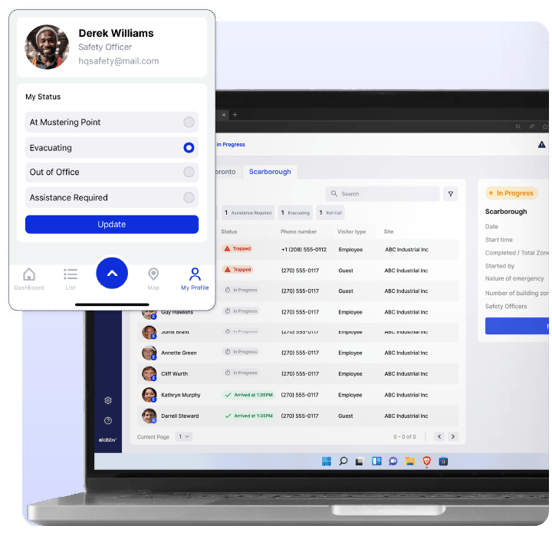
A mobile emergency management app eliminates that bottleneck. When an evacuation is triggered, purpose-built emergency management solutions automatically send SMS notifications to employees, visitors, and contractors identifying available mustering points. Safety Officers are pre-assigned to specific points, giving each location a designated accountable person rather than whoever happens to be nearby.
Roll calls via the mobile app at their designated assembly area, with mustering points pinned on Apple and Google Maps so no one has to guess where to go. The best solutions support multiple roll call methods depending on the situation:
- QR code scan: Each evacuee has a unique QR code on their mobile device. A Safety Officer scans it at the muster point to instantly confirm their status, no verbal roll call required.
- App check-in: Safety Officers manage and update evacuee status directly from the mobile companion app in real time.
- SMS roll call: For evacuees who cannot reach a muster point, an automated SMS allows them to confirm their safety remotely. This is particularly useful for large sites, multi-building campuses, or situations where part of the facility is inaccessible.
All roll call data is centralized across every muster point in a single remotely accessible location. Filters surface unaccounted personnel at the top of the list automatically, keeping Safety Officers focused on who still needs to be found. Mustering data feeds into a secure, cloud-based record available immediately for post-incident review and compliance reporting.
For example, EmergencyOS tracks estimated vs. actual arrival times at each mustering point, giving safety teams objective data to evaluate response effectiveness after the event.
4. Coordinate Across Multiple Mustering Points & Buildings Simultaneously
For multi-site organizations, a mobile emergency management app solves a coordination problem that manual processes cannot. A single emergency can require action across several locations at once. Coordinating that response manually, calling each site, waiting for confirmation, relaying instructions, adds significant time and introduces communication gaps.
When an emergency is triggered in the system, evacuation protocols initiate across all relevant buildings, zones, and mustering points simultaneously. The mobile app is what keeps coordinators connected throughout that response. Each site receives the alert, launches its own workflow, and feeds accountability data back into a unified view that every coordinator can see from their phone.
Healthcare systems, university campuses, manufacturing operations, and large enterprise facilities are especially exposed to this risk, as a threat in one building can require immediate action in several others.
5. Real-Time Accountability Visibility for Every Coordinator
A mobile emergency management app does not just collect accountability data during an evacuation. It makes that data visible to every coordinator who needs it, in real-time.
Mustering handles the collection side. Visibility determines how useful that data is when decisions need to be made. A mobile emergency management app gives every designated coordinator, Safety Officer, and building manager a live view of who has been accounted for and who has not, updated in real time as check-ins come in. That list should not be limited to employees.
Look for solutions that integrate with visitor management, time and attendance, and access control systems to pull a complete picture of who was on site at the time of the event, including visitors and contractors. ASIS research found that 50% of organizations cannot access a list of current onsite visitors, and 61% cannot monitor live status during emergencies. Those gaps create direct accountability risk when they go unaddressed.
This visibility layer is what allows coordinators to make decisions during an active incident: whether to send someone back in to look for an unaccounted individual, when to give all-clear, and what information to hand off to first responders when they arrive.

6. Evacuation Records Flow Into Your Central System — Accessible on Demand
A mobile emergency management app eliminates the post-incident scramble for documentation. After an evacuation, fire marshals, safety inspectors, and internal leadership need records of what happened, when it happened, who was on site, and how long the response took. Pulling that information from paper logs and manual notes takes time that organizations often do not have.
What makes mobile emergency management apps effective here is not just what they capture during the incident — it is where that data goes afterward. Headcount results, timestamps, response durations, and accountability status are all logged automatically and flow directly into a cloud-based system of record. That means the moment an incident closes, the data is already where it needs to be: accessible from any device, shareable with authorities or inspectors on site, and ready for internal review without anyone having to manually compile a report.
Cloud-based storage also means nothing is lost if a device is misplaced or damaged. The record exists independently of the phone it was collected on, and the right people can access it from wherever they are.
7. Drills Support Regulatory Compliance and Close Readiness Gaps
Regulatory requirements don't just mandate having an emergency plan — they require proving it works. OSHA's emergency action plan standard (29 CFR 1910.38) requires employers to establish written emergency action plans and, for certain facilities, conduct regular employee training and drills. Local fire codes add jurisdiction-specific drill frequency requirements. ISO 45001, the international standard for occupational health and safety, incorporates emergency preparedness as a core element of certification.
This is where the mobile app becomes a direct part of the compliance workflow. When a drill runs, it uses the same mobile workflows as a real emergency: Safety Officers manage mustering from their phones, personnel check in via the app or QR code scan, and accountability data is captured in real time. Because the drill runs on the same system as an actual evacuation, the data it generates is immediately usable. Participation rates, individual response times, and evacuation durations are logged automatically, feeding a digital audit trail that serves directly as compliance documentation for internal reviews and regulatory audits.
The broader platform supports the full drill lifecycle around it, including scheduling, reminders, profile testing, and records management, but the mobile app is what makes the drill itself run the way a real emergency would. That alignment between drill and reality is what closes readiness gaps, and it's what gives the resulting documentation its credibility.
The Bottom Line
Mobile emergency management apps remove that friction by putting the full response capability in the hands of every coordinator, on any device, from any location on site.
One capability worth watching as mobile tools continue to mature is hazard intelligence integration. Many workplace emergencies are preceded by external conditions — an approaching severe weather system, a public safety incident nearby, a hazardous material event in the area. Organizations that learn about those threats through general news sources or personal alerts are reacting late. Connecting real-world hazard data directly to your response workflow, tied to your site's location, closes the gap between awareness and action. This is already available in desktop-based emergency management platforms, and it represents a natural next step for mobile — giving coordinators the same early-warning capability from their phone that they currently have at their desk.
For facilities managing real people across real locations, the gap between a well-executed evacuation and a disorganized one is largely a function of tooling and preparation.
Frequently Asked Questions
What is the best mobile app for emergency management at work?
For facilities and enterprise organizations, look for a purpose-built emergency management platform rather than a general communication tool. The right solution should support the full evacuation lifecycle from a mobile device: receiving and acting on emergency alerts, managing digital mustering across multiple points, tracking real-time accountability for employees, visitors, and contractors, running and logging drills, and generating compliance documentation. It should also integrate with visitor management, access control, and time and attendance systems to ensure accountability lists reflect who is actually on site. EmergencyOS is one example of a solution built specifically for this use case.
Can emergency management apps work without internet?
Yes. Purpose-built emergency management apps for businesses are designed to function offline so that core evacuation workflows remain operational even when cellular or Wi-Fi networks are unavailable. Data syncs when connectivity restores.
How do digital mustering work?
Digital mustering replaces paper-based roll calls. When an evacuation is triggered, employees, visitors, and contractors are automatically notified of their assigned muster point. Once on site, Safety Officers conduct roll calls digitally through the mobile app, scanning QR codes or marking personnel as accounted for in real time. Managers across all muster points get a live view of accountability status as check-ins come in, with the full record logged automatically for post-incident review and compliance reporting.
Are emergency management apps required by law?
The apps themselves are not legally mandated, but the outcomes they support often are. OSHA's emergency action plan standard (29 CFR 1910.38) requires documented evacuation procedures and, for many facilities, regular drills. Local fire codes and ISO 45001 add additional requirements. Mobile emergency management apps help organizations meet and document these requirements more efficiently than manual systems.
Stay updated with industry insights, success stories, and more. Follow us on social media for the latest FacilityOS content.
 Follow us on Facebook
  Follow us on X
 Follow us on LinkedIn