
The delivery truck backs up to the dock. The back door rolls up, and you see a wall of cardboard boxes floor-to-ceiling. For many mailroom managers, this sight doesn't bring excitement—it brings a spike of stress.
You know that once those packages are unloaded, the clock starts ticking. You have to log them, sort them, store them, and notify the recipients. And you have to do it all while your phone is ringing and people are stopping by the window to ask, "Has my package arrived yet?"
If you feel like the volume of mail is getting harder to handle, you are not imagining things. In the United States alone, shipping volume has exploded, with an estimated 23.4 billion parcels shipped annually.
Yet, despite this massive increase in volume, many mailrooms still rely on manual workflows like paper logbooks or spreadsheets.
Trying to manage modern shipping volumes with old-school tools is a recipe for burnout. It leads to lost items, frustrated employees, and a mailroom team that feels constantly behind.
The good news is that there is a better way to work. By moving to automated mailroom package tracking, you can calm the chaos, protect your team from blame, and finally get home on time.
The Problem with Manual Logs (and Why Packages Get Lost)
The biggest fear for any mailroom manager is a lost package. It creates immediate tension. The recipient is upset, and usually, the mailroom gets the blame.
When you rely on paper logs or manual data entry, mistakes happen. Handwriting can be hard to read. A tracking number might get typed into a spreadsheet incorrectly. Or, a package might be signed for at the dock but placed on the wrong shelf because there was no system to tell the clerk where to put it.
According to recent data, 1.7 million packages disappear every day in North America. While many of these are "porch pirate" thefts, a significant number are simply misplaced within internal mailrooms or corporate buildings.
Lost packages in the mailroom often aren't truly lost—they are just invisible. They are sitting in a pile or on a desk, but because the manual log isn't accurate, no one knows where to look. Automation solves this by creating a digital chain of custody.

What is Chain of Custody?
Chain of custody sounds like a legal term, but for a mailroom manager, it just means "proof of touch." It is a record of everyone who handled a package from the moment it arrived at your facility until it reached the final recipient.
With mailroom automation tools like LogisticsOS, this process happens instantly:
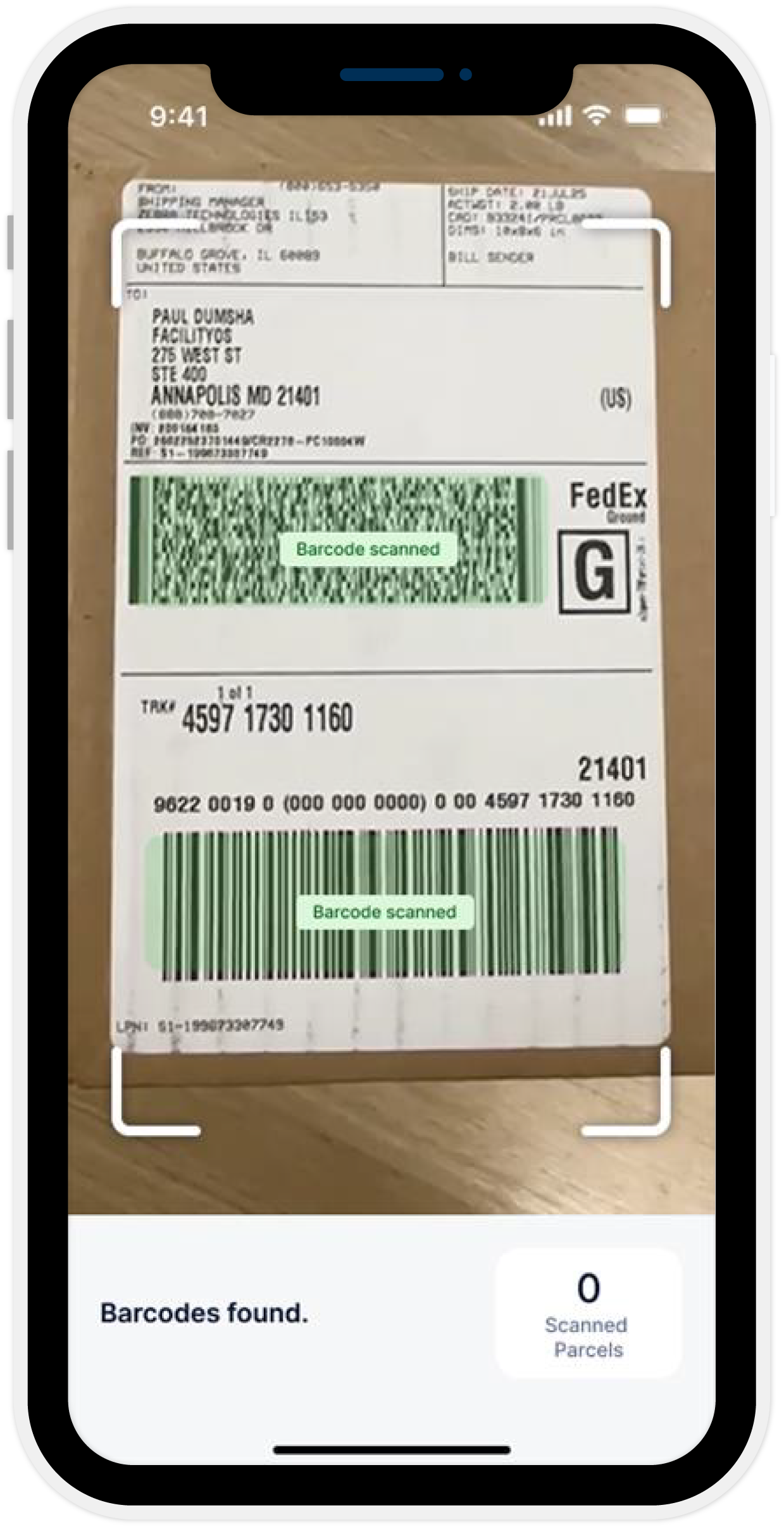
1
The Scan
When a package arrives, you use digital intake (OCR) to capture data quickly on your mobile. The AI Receiving Assistant reads the label for you, eliminating manual typing errors.
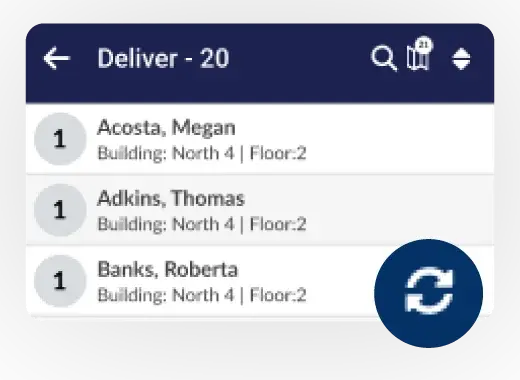
2
The Sort
The system tells you exactly who the package is for and logs it in real-time.
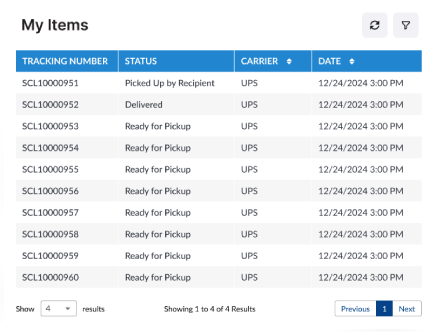
3
The Handoff
Every movement is tracked via barcode scans, ensuring accountability at every step.
This creates a perfect digital trail. You know exactly when it came in, who processed it, and who signed for it. If a package goes missing, you don't have to hunt through a paper binder. You just type the name into your system, and you can see exactly where the chain broke.
Stopping the "Where's My Package?" Interruptions
Nothing slows down a mailroom team more than constant interruptions.
You are in the middle of sorting a large delivery, and someone knocks on the window. "Hey, I got a notification from Amazon that my package was delivered. Do you have it?"
You have to stop what you are doing, walk over, check the log, look through the piles, and maybe find nothing because the carrier hasn't actually dropped it off yet. Then, five minutes later, the phone rings with the same question from someone else.
These interruptions kill your productivity. They are a major cause of burnout because they prevent you from getting into a rhythm.
Digital mailroom management tools stop these questions before they start.
When you scan a package upon arrival, the system automatically sends email or text alerts to the recipient with delivery details. The message says, "Your package is here and ready for pickup."
This keeps the recipient informed without them having to ask you. It creates a self-service loop. If they haven't received an email from your system, they know the package isn't ready yet. This silence is golden for a busy mailroom manager. It allows you to focus on the work in front of you.

How to Reduce Delivery Disputes
"I never got that package."
These five words can ruin a mailroom manager’s week. Even if you know you delivered it, proving it can be a nightmare if you are using paper logs. Signatures in a book are often illegible scribbles. If you can't prove delivery, your department might be on the hook for the cost of the lost item.
This is why you need to reduce delivery disputes with solid proof.
Automation protects you with definitive Proof of Delivery features:
-
Digital Signatures: Capture recipient signatures directly on a handheld device to confirm successful handoffs.
-
Timestamps: The system records the exact second the transaction happened.
-
Audit Compliance: Digital logs maintain records necessary for industry standards and security, giving you a defensible audit trail.
If an employee claims a package is lost, you can pull up the record in seconds. You can show them, "It was signed for by John Smith at 10:42 AM on Tuesday." Having this data instantly available usually resolves the dispute immediately.
Reducing Burnout with a Calmer Workflow
The goal of adding technology to the mailroom isn't to make things complicated. It is to make things simple and create a calmer workflow.
Burnout happens when you feel like you have no control. It happens when you are working as hard as you can, but the piles of boxes keep growing and the complaints keep coming.
Moving to mailroom automation gives you control back.
It organizes the chaos: You process packages faster with OCR intake than with pens.
It communicates for you: Automated notifications talk to recipients so you don't have to.
It watches your back: Digital chain of custody proves you did your job correctly.
It measures success: Productivity metrics allow managers to see exactly how many packages are handled per employee, helping justify staffing needs.
Instead of dreading the delivery truck, you can handle the influx with confidence. You can verify deliveries, notify staff, and clear the floor quickly.
Summary: A Better Way to Manage Mail
You work hard to keep your facility running. You deserve tools that work as hard as you do.
Sticking with manual logs and spreadsheets in an era of skyrocketing shipping volumes is a battle you can't win. By adopting modern mailroom package tracking, you aren't just buying software—you are buying peace of mind.
You are building a system where packages don't get lost, disputes are settled in seconds, and you can finish your shift without the stress of constant interruptions.
Looking for a Way to Streamline Your Mailroom?
If you are ready to ditch the clipboards and take control of your package volume, FacilityOS can help.
FacilityOS offers a comprehensive digital mailroom package tracking system powered by LogisticsOS. It provides real-time visibility into every item, from intake to final delivery.
With features like our AI Receiving Assistant for quick OCR scanning, automated recipient notifications, and robust proof-of-delivery tools, you can streamline inbound and outbound workflows effortlessly.
Reduce lost items, ensure audit compliance, and optimize your mailroom productivity today.
See how you can streamline your operations with FacilityOS.
Stay updated with industry insights, success stories, and more. Follow us on social media for the latest FacilityOS content.
 Follow us on Facebook
  Follow us on X
 Follow us on LinkedIn