
In a modern security and workplace operations environment, handling visitor access as a smooth, unified flow is a critical requirement to ensure compliance and security, but also impacts the visitor experience. Too often, visitors arrive with minimal screening, wander zones they shouldn’t, leave behind paper logs—and security and property teams are left scrambling.
This article dives into how organizations can implement pre-approval checks, zone and time rules, badge lifecycle management, real-time status at gates, and full access history in one coherent flow—from invitation to exit.
We’ll walk you through the key steps and workflow, explore best practices for integrating visitor management with access control, provide practical case examples, and offer fresh insights tailored for security teams, workplace operations managers and property owners. By the end you’ll have a clear framework to upgrade your visitor-to-access process, reduce risk, streamline reception and provide full auditability. Ready to turn your front desk into a true control point—not a bottleneck? Let’s get started.
Why One Unified Flow Matters in Visitor Access
In many of the facilities I’ve visited alongside security teams, the front-desk still handles visitor access with disconnected systems: one form for pre-registration, a paper log for arrival, a badge printed manually, and no automated link to the building’s access control system. Whether it is in food production or data center security - the challenges remain the same. For today’s security, workplace operations and property management teams, that scatter of tools presents risk, inefficiency and a poor visitor experience.
Risk: Without a unified process you might miss a visitor entering a restricted zone, or a badge left active past their visit. Modern systems put “real-time visitor check-in dashboard” and “visitor audit trail” front and centre, supporting both safety and compliance.
For example, a 2023 study found that:
78% of facilities don't feel confident in their current visitor security practices.
FacilityOS+1
Efficiency: Imagine your workplace operations team being able to review visitor flow in one pane of glass. With one integrated “guest access lifecycle tracking” system, hosts receive arrival notifications instantly, badges are activated automatically based on pre-registration, and security can see exactly who’s inside. That translates to fewer bottlenecks and better first-impressions for visitors.
User experience: From a property-management perspective, multi-tenant lobbies in particular benefit from a seamless flow – visitors feel welcomed, hosts are notified, and the system enforces “zone-based access control for guests” so they only access the areas they’re supposed to.
Unique Insight
Many teams talk about “digital visitor management”, but they stop at check-in. The real value for Security and Workplace Ops is when the flow extends past check-in: to badge lifecycle management, real-time gate status, zone/time enforcement, and full access history reporting. This end-to-end visibility is the differentiator between a good front desk and a strategic access-control hub.
Pre-Approval Checks: The First Gate in the Process
Pre-approval checks form the first major control point in a unified visitor-to-access flow. They answer the questions: Is the visitor invited or valid? Has screening been done? What areas and time windows apply?
Invitation & pre-registration workflows: Rather than handling every walk-in as an ad-hoc event, best-practice systems allow hosts to send invitations ahead. The visitor receives an email or link to complete their details, upload ID, and select their visit purpose. This “visitor pre-registration screening” eliminates many manual tasks and enables early decision-making.
Screening & watch-list checks: Once the visitor submits information, the system performs checks—for example against denied-party lists or banned-visitor registers. For instance, one vendor highlights how their platform “allows front desk personnel to quickly run a check against denied party lists whilst simultaneously processing them and printing a badge.” This ensures high-risk visitors are flagged before arrival.
Zone & time rules defined upfront: The invitation workflow should allow the host/security team to specify which zone (e.g., floor 5, lab suite, visitor lounge) and time (e.g., 9:00 – 11:00 am) the visitor will be permitted. In doing so, the system automatically assigns limitations that will later enforce badge validity. This is the basis of “time-bound access for visitors”.
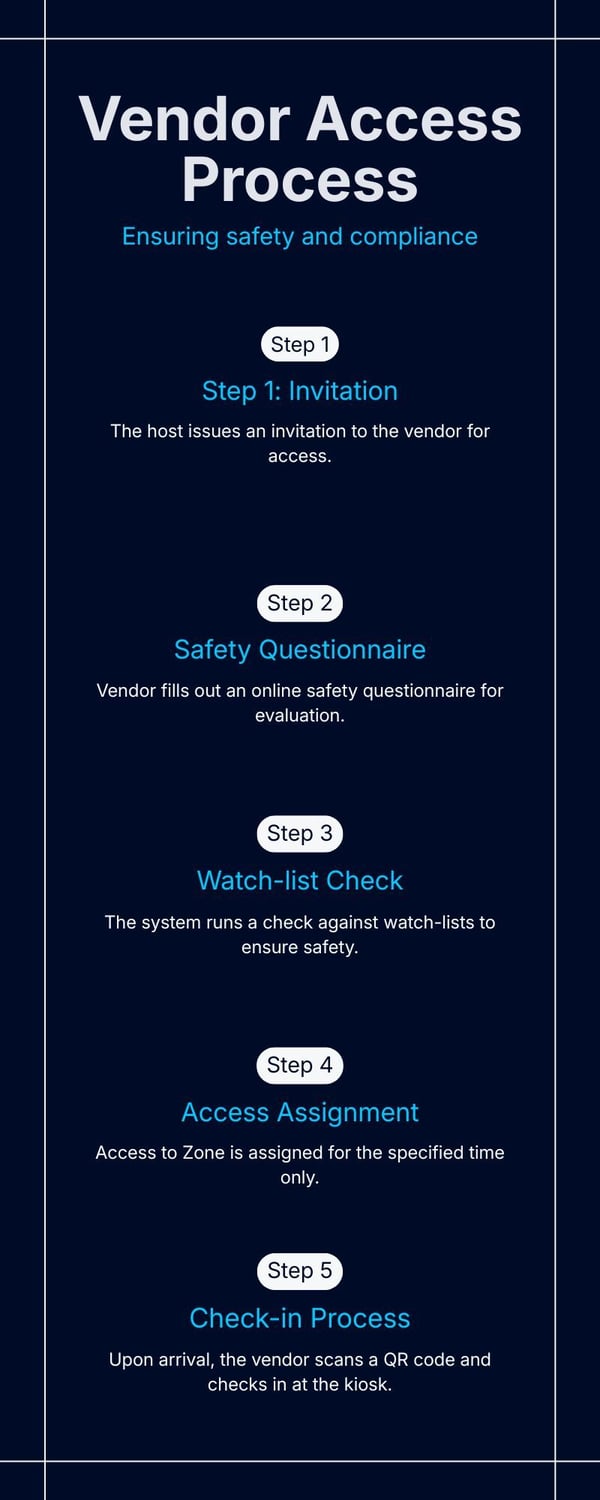
Example: Consider a manufacturing facility with a contractor vendor. The host issues an invitation, the vendor fills out a safety questionnaire, the system runs a watch-list check, then automatically assigns them access to Zone C for 14:00-17:00 only. On arrival the visitor scans their QR code, checks in at the kiosk, and receives a badge valid only for that window. That ensures the vendor cannot access other floors or stay overnight.
|
Unique Insight
Pre-approval checks are often treated as a one-time step, but in a true “visitor access management workflow” they should feed directly into the badge issuance and access control systems, setting a single rule that governs entire visit lifecycle. When that upstream integration is missing, manual override becomes the default—and risks creep in.
Zone and Time Rules: Defining Where & When Access Is Granted
Once a visitor is pre-approved, the system must enforce zone and time rules so that access is actively controlled, not just recorded. Think of these as “guardrails” that govern the visitor’s entire stay.
What are zone rules?
These define the physical or logical areas a visitor may access: a lobby, floor 10, data-centre mezzanine, or a tenant suite. With modern VMS platforms, hosts can select predefined zones or customise new ones. The system then assigns credentials to enforce only those zone permissions. For example, one vendor explains “self-expiring badges & cards” tied to zone rules and the visitor’s path.
What are time rules?
These define the valid timeframe for access: a start and end timestamp, or even repeating windows (e.g., every Wednesday 1pm-3pm). A badge might automatically deactivate at the defined time, preventing lingering after-hours access or unsupervised presence.
How are these enforced?
By integrating with the organization’s physical access control system (PACS) or turnstiles, the VMS ensures that when a visitor presents their badge or QR code, the access attempt is validated against both zone and time criteria. If they attempt entry too early/late or outside zone, the gate remains locked and an alert triggers. A best-practice article notes that integration of VMS with access control enables “automatically synchronizing visitor info with your access control system and maintain complete security.”
Example: Multi-Tenant Building
In a large commercial tower hosting several tenants, the property management team defines zones per tenant suite (floors 10-15 for Tenant A, floors 16-20 for Tenant B). Visitors are pre-approved for specific zones and times – e.g., a vendor for Tenant A is permitted floor 12 only between 08:00-12:00. On arrival, the badge only opens the corridor turnstile for floor 12, and after 12:00 the badge is automatically invalidated. This minimizes cross-tenant access and improves security in shared-space environments.
Unique Insight
Many organizations focus on “who” and “when” but less on “where”. By making zone and time rules core to the visitor workflow, property managers and security teams shift from retrospective logging (visitor showed up) to proactive control (visitor can only access zone X in window Y). That is a real leap in operational maturity.
Badge Lifecycle Management: From Issue to Deactivation
The badge issuance process is where the visitor management workflow meets physical access—so getting the badge lifecycle management right is crucial.
Badge Issuance
Once pre-approval and zone/time rules are set, the visitor receives credentials. These may be a printed badge, a mobile QR code, or a smart access card. Modern systems support “temporary visitor badge issuance” tied to the individual visitor profile and rule set. For example, one platform promises badges with “visitor badges are entirely customizable… automatic activation/deactivation upon check-in/check-out.”
Validity Monitoring & Expiry
The badge should carry metadata on zone/time validity and visitor type. When the time window ends (or visitor checks out) the badge must automatically expire. This prevents undesirable scenarios like badges left active overnight or reused by others. One vendor spoke about “self-expiring badges” in their badge printing offering.
Check-Out & Revocation Processes
At the end of the visit, the visitor checks out via kiosk or mobile app, signifying departure. The system revokes the badge credential, logs the exit time, and updates the “on-site list”. For security teams, this ensures a current accurate list of who is still onsite. One solution emphasizes the importance of a live on-site list for emergency mustering.
Example
In a healthcare facility, a specialist arrives at 14:00, is assigned zone “Imaging Suite”, time window 14:00-16:00, and receives a badge. At 16:05 the badge becomes invalid. If the specialist tries to enter again at 17:00, the turnstile denies access and security is alerted automatically.
Unique Insight
Badge lifecycle is often treated as an operational detail à la “print the badge and we’re done”. But when linked with the zone/time rule, real-time gate status and full access history, the badge becomes a live instrument of control—not a passive token. For Workplace Ops and Property Management teams, this linkage drives real operational value (reduced tail-gating, accurate mustering, audit data).
Real-Time Status at Gates & Entry Points
A unified visitor access flow must deliver real-time status at gates and entry points so that security, reception and operations stay in sync. For example:
1. Integration With Access Control & Turnstiles
The visitor credential (badge/QR/mobile) must communicate with the physical access control system (PACS) so each attempt—entry or exit—is logged in real time. Best-practice guides emphasize integrating VMS with access control to create one robust framework. Some vendors offer blended hardware and software solutions with a goal to provide a more integrated solution.
Often times, this can result in selecting a software solution that doesn't flexibility or long-term scalability, leading to vendor "lock-in" where you are tied to a specific selection of hardware. Many organizations find that purchasing a best-in-class visitor management solution that is open, easily scalable and flexible is key.
2. Real-Time Dashboards for Security & Reception
Security teams benefit from dashboards that show current visitors, which zones they are in, and whether any rule violations are occurring. Reception can view waiting guests and send host notifications. One vendor states 93% of organizations saw improved efficiency when visitor check-in was streamlined. (Source: FacilityOS)
3. Alerts & Escalation
If a visitor attempts access outside the permitted zone/time window, or tries to enter a restricted area, the system must raise an alert, via SMS, email or control-room notification. This enables proactive response rather than reactive investigation.
Example
At a corporate campus, the security dashboard shows a visitor badge that has attempted entry into a secure server room (zone “IT Core”)—which was not permitted under their rule set. The system flagged the attempt, triggered the turnstile lock, alerted security, and logged the incident for audit.
Unique Insight
Real-time gate status is where control becomes actionable. Many systems build in check-in and badge issuance, but without monitoring what happens after entry. For property managers, combining real-time status with visitor data means you can measure dwell time, highest traffic zones, and peak visitor flows, turning a security tool into an operational tool for space utilization.
Full Access History: Auditability and Reporting
Finally, a truly mature visitor-to-access flow delivers full access history, making it possible to answer “who was in the building, where, when, how long, and which zones they accessed”.
Logging All Visit Events
The system captures time stamps for registration, check-in, badge issuance, zone entry attempts, exits, and check-out. These logs feed into the “visitor audit trail” and are critical for investigations or compliance audits. For example, one blog outlines how VMS platforms now provide “visitor logs, analytics, visits scheduling, and access control integration”.
Compliance & Regulatory Requirements
Many facilities need to demonstrate visitor control for ISO 27001, SOC 2, or other regulatory standards. Being able to run a report that shows “all visitors on March-12, zone entries, times” is essential. A source notes that a system can provide “an accurate list of all guests and visitors on-site at any given moment” which is vital for evacuation or regulatory compliance.
Analytics: Trends, Bottlenecks, Risk Areas
For workplace ops or property managers, the access history becomes a rich dataset. Pulling metrics such as average check-in time, most visited zones, number of after-hours visitors, or badge revocations helps inform policy, staffing, and layout.
Example
A multi-tenant building reviews the last quarter’s visitor reports and sees that Zone “Rooftop Lounge” had 45% of visitors stay past scheduled time windows. The property team uses that insight to modify the zone/time rules for that area (shorter access window) and increase signage. Emerging Visitor Management solutions also include integrated AI chat capability to help teams review query visitor logs to gain insights into how to better manage the visitor management process, tighten security and be more compliant.
Unique Insight
The access history isn’t just for compliance—it’s a business intelligence asset. For property management, combining visitor data with occupancy and space usage gives actionable insights (e.g., which zones attract visitors most, when to allocate concierge staffing, when to schedule deliveries). That transforms your visitor management system into a strategic tool.
Technology Ecosystem: What Underpins the One Flow
To support the unified flow from invite to audit trail, several technology components must work together….
Visitor Management System (VMS) Features
A modern VMS supports pre-registration, screening, badge template design, check-in kiosks or mobile apps, integration with access control, and reporting. For example, one vendor emphasizes features like “visitor badging, customizable registration forms, ID scanners, real-time visitor location and reporting”.
Access Control System Integration
Integration with PACS (credentials, turnstiles, door readers) is essential to enforce zone and time rules. A best practice article outlines “centralize data and operations” and “streamline badge issuance and access permissions” when VMS and ACS are integrated.
Badge Printers, Kiosks, Mobile Credentials
Physical infrastructure such as kiosks for self-service check-in, badge printers (adhesive or PVC), mobile credentials or QR codes allow flexibility depending on site profile. For example, one platform offers badge printing with custom templates and supports multi-day events. (Source: FacilityOS)
Emerging Tech – Touchless Check-In
With hybrid work, and after COVID-19, touchless check-in (mobile QR), and credentials stored in mobile wallets become more important. One vendor highlights “visitor badge management with touchless mobile credentials and dynamic zone/time updates”.
Unique Insight
While the technology ecosystem is broad, the value comes when these pieces are configured as one flow. Many organizations deploy separate systems (VMS in the lobby, ACS at doors, badge printer in admin) but they don’t integrate. For Security, Workplace Ops and Property Management, the ROI comes only when data flows and rules persist end-to-end—from pre-registration all the way to exit. Selecting a visitor management solution that offers deep integrations to a wide variety of endpoints and industry standard solutions allows you to build and scale the right solution for your business.

Implementation Roadmap for Security & Ops Teams
Bringing this unified visitor-to-access flow into your organization requires a planned roadmap—especially when coordinating between Security, Workplace Operations and Property Management teams.
1. Define stakeholder roles:
Assign ownership—Security leads on screening and rule enforcement; Workplace Ops handles check-in experience and visitor flows; Property Management owns shared zones, tenants and reporting. A cross-functional steering group ensures each view is captured.
2. Map the workflow:
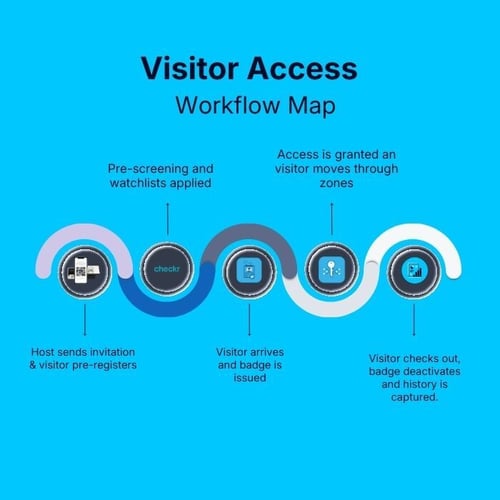
Identify every step: host sends invitation → visitor pre-registers → screening & zone/time rules applied → visitor arrives and checks-in → badge is issued → access is granted via badge → visitor moves through zones → visitor checks out → badge deactivates → access history captured. Document this as “guest access lifecycle tracking”.
3. Pilot, roll-out, training and change management:
Start with one building or visitor type (e.g., contractors) to validate zone/time rules, badge lifecycle and real-time monitoring. Train reception, security, hosts and facilities teams. Roll out broadly once the pilot is stable.
4. Risk-mitigation steps:
Ensure your vendor supports integration with your ACS, badge hardware and reporting needs. Develop a fallback manual process for receptions in case of system downtime. Conduct checklist reviews for pre-approval and screening criteria.
Unique Insight
Many organizations underestimate the behavior change required. Hosts must learn to send invitations ahead; reception staff must trust the system and stop relying on paper logs; security must shift from reactive to real-time monitoring. Investing in training early saves time and frustration later.
Metrics & KPIs to Measure Success
To ensure the investment delivers value, you’ll need to track relevant metrics tied to visitor-to-access workflows.
- Visitor check-in wait time: Measure average time from arrival to badge issuance. A drop in wait time signals smoother workflow.
- Percentage of pre-approved visits vs walk-ins: Higher pre-approval rates indicate better host engagement and fewer ad-hoc risks.
- Number of badge revocations / rule violations: Track how often zone/time rules are broken or badges manually revoked. A decline means better control.
- Audit readiness: time to generate access history report: If generating a visitor access audit takes minutes instead of days, your system is working.
- Other KPIs: visitor dwell-time in zones, number of visitors onsite at peak times, time until host notification after visitor arrival.
Unique Insight
For property management teams especially, tracking visitor flow can inform space utilization—e.g., visitor peak periods may signal need for more concierge staffing or bigger lobby area. So link security KPIs with operational KPIs for maximum benefit.
Visitor Flow Challenges & How to Overcome Them
Even the best-designed flows face real-world obstacles. Here are some common challenges and how to address them.
- Legacy systems and integration barriers:
Many organizations have older ACS or badge printers that don’t talk easily to a modern VMS. Overcome this by selecting a vendor with open APIs and prioritizing integration during selection. A best-practice article highlights the need to “choose a system that allows seamless data integration” to avoid silos. - User resistance (receptionists, hosts):
If hosts continue to bring walk-in visitors without pre-registration, or reception keeps paper logs “just in case,” your unified flow won’t be fully adopted. Mitigate this with training, change-management and perhaps incentive metrics (e.g., % of invited visitors processed by pre-registration). - Data privacy and visitor data handling:
Collecting visitor data (ID scans, photos, check-in/out times) triggers GDPR, HIPAA or other regional privacy concerns. Work with legal/IT to define data retention rules, anonymization and access controls. Some platforms emphasize “visitor data is securely managed” as a key feature.
Unique Insight
One of the less-discussed issues is zone/time violations by legitimate visitors (e.g., a host lets a visitor roam beyond permitted zone). To handle that, you need both technology (real-time alerts) and culture/training (hosts must understand consequences). It’s not enough to set the rule—you must monitor it and respond.
Best Practices for Security, Ops & Property Management
Here are actionable best practices you can implement now.
-
Standardize visitor types and templates: Define categories (e.g., “Executive Guest”, “Contractor”, “Delivery Driver”) and for each set default zone/time rules, badge templates, screening requirements.
-
Define zone/time rules in partnership with operations: Security may define “Zone A – Data center”, but Ops may know that during maintenance the zone needs to open to contractors for 2 hrs. Don’t build rules in a vacuum.
-
Automate badge issuance and deactivation: Eliminate manual badge hand-offs. Use “temporary visitor badge issuance” that automatically expires or is revoked at checkout.
-
Quarterly reviews: access history audits: Pull the “full access history” reports periodically and look for anomalies: frequent over-stayers, repeated zone entry attempts outside rules, high volume of last-minute visitors.
-
Train hosts and reception: Equip your teams with quick-reference guides on the unified flow. Make sure they know how to pre-register, send invites, check in, manage exceptions.
-
Monitor KPIs and adjust: Use the metrics in section 11 to review performance each month. If wait times creep up or rule violations rise, investigate workflow bottlenecks.
Unique Insight
A best practice not often emphasised: simulate an after-hours scenario quarterly. What happens if a visitor badge is still active at 20:00? Does the system automatically expire? Does security get an alert at the gate? These simulated tests validate your zone/time enforcement and badge lifecycle controls.
Future Trends: What’s Next in Visitor-to-Access Flows
The visitor-to-access discipline continues to evolve. Here are key trends to watch.
- AI-driven risk analysis at pre-approval: Rather than simple watch-list checks, today's leading solutions are rolling out AI-powered behavioral, historical and contextual data analysis (e.g., visitor’s country, host profile, purpose). In the future, these systems will automate risk scoring, badge issuance, compliance tracking and more..
- Mobile credentials and dynamic zone/time updates: Visitors will receive credentials directly on their phone; zone and time rules may change in real time (e.g., if a scheduled meeting runs late, the system extends access automatically). This enables a “fluid” access experience without security compromise.
- Integration with building systems (HVAC, elevators, facility maintenance): “Full access history” will feed into building-management systems. For instance, the elevator will unlock floor access only for authorized visitors; lighting/HVAC will adjust when visitors enter/exit zones, improving both security and operations.
Unique Insight
For property management teams especially, this means visitor access flows will increasingly tie into building experience (not just security). The visitor badge may become the key to everything—from elevator access to WiFi onboarding to cafeteria payment—turning the badge lifecycle into a holistic guest journey.
Quick Takeaways
-
Implementing one unified visitor-to-access flow—from pre-approval through badge lifecycle to exit—boosts both security and operational efficiency.
-
Early pre-approval checks set the stage: invitations, screening, zone/time rules before arrival.
-
Zone and time rules ensure visitors only access defined areas within defined windows, enforcing “where and when” access.
-
Badge lifecycle management ties badge issuance, validity monitoring and revocation together—preventing forgotten active badges.
-
Real-time status at gates gives security and reception live visibility into who’s onsite, where they are, and if rules are violated.
-
Full access history enables audit trails, compliance reporting and operational insights for space usage and visitor trends.
-
Success depends on technology integration (VMS + ACS) and stakeholder collaboration (security, ops, property management).
-
Track key KPIs, run quarterly simulated audits, and prepare for future mobile-centric, AI-enhanced visitor access flows.
Conclusion
Done right, visitor management goes beyond welcoming guests. It means ensuring the right people access the right zones at the right times, with full traceability from arrival to exit. By architecting a visitor-to-access flow that embeds pre-approval checks, zone and time rules, badge lifecycle management, real-time status at gates and full access history, security teams protect assets, workplace operations teams improve efficiency, and property managers deliver a seamless experience across tenants and sites.
Remember: pre-registration reduces risk, zone/time rules enforce boundaries, badges must be managed across their lifecycle, gates must reflect real-time status, and the resulting data must be available for auditing and operational intelligence. The real power lies not in any single feature—but in connecting them end to end.
If you’re a Security or Workplace Ops professional, begin by mapping your current visitor workflow, identifying the weakest link (usually manual badge issuance or lack of gate integration), and then prioritize a system or process that closes that gap. Property Managers should ask: does our shared-space visitor process support tenant separation, auditability and data visibility? And does our system scale across multiple buildings?
I invite you to take this framework, tailor it to your environment, and start turning your front desk from a reception point into a strategic access hub. When you’re ready, schedule a walkthrough of your current visitor workflow—identify what’s missing—and work with your teams to design a unified flow. Better security, smoother operations and enhanced transparency await.
Stay updated with industry insights, success stories, and more. Follow us on social media for the latest FacilityOS content.
 Follow us on Facebook
  Follow us on X
 Follow us on LinkedIn