
Most facilities still confirm identity at the front desk by checking a name against a memory, an ID, or a sign-in sheet. That approach catches the visitor who looks out of place. It misses the visitor whose risk is documented somewhere the front desk cannot see. Third-party watchlist screening closes that gap by checking each visitor against criminal, sanctions, and offender data at the moment they sign in, so a flagged individual is identified before a badge is printed rather than after an incident.
This page covers what watchlist screening involves, which lists facilities screen against, where screening fits across the visitor lifecycle, and how a visitor management system runs the checks automatically.
What Is Third-Party Watchlist Screening in Visitor Management?
Third-party watchlist screening is the process of automatically checking a visitor's information against external risk databases during sign-in. A watchlist is any list of individuals or organizations flagged for a defined reason: a criminal record, a place on a sanctions list, a sex offender registry entry, or a denied parties designation from a government agency.
When watchlist screening runs inside a visitor management system, the check happens as part of pre-registration or kiosk check-in. The system cross-references the visitor against the configured lists, and a match triggers an alert before entry is approved. Visitors can also be checked against custom internal lists a site maintains, such as individuals previously removed from a property.
The value sits in two places. Screening surfaces risk that is documented but not visible to reception staff, and it creates a logged record of every check, which supports compliance reporting and audit requests.
Which Watchlists Do Facilities Screen Visitors Against?
The right mix of lists depends on the industry, the site, and the visitor type. Chris Hollindale, Head of Product at Checkr Trust, framed the landscape in a recent FacilityOS webinar on visitor screening. The categories below summarize the most common sources and what each one signals.
Criminal Database Screening
Criminal records are one of the strongest available predictors of safety risk, because past behavior is a strong statistical indicator of future behavior in similar contexts. The challenge is access. Criminal records in the US are decentralized across thousands of local jurisdictions, with police, sheriffs, courts, and corrections each maintaining separate systems, and some records still exist only on paper.
There is no single national lookup for criminal data. Companies that aggregate this data build direct relationships with courts and acquire records in bulk to make them searchable. Even the most comprehensive databases reach an estimated 80 to 85% of felonies nationwide, so it helps to ask any screening vendor where their data comes from and what it covers.
Sex Offender Registries
Sex offender data is consolidated more cleanly than general criminal data. Each state maintains a registry, and those feed the National Sex Offender Public Website (NSOPW). This screening is especially relevant for healthcare, education, and other settings with vulnerable populations. One consideration is timing, since data can take time to move from local jurisdictions up to the national registry, so a manual search may not reflect the most current information.
Warrants and Arrest Records
Active warrants and arrest records work as proxies for criminal risk where standard criminal data is hard to obtain. In California, for example, much criminal record data is redactable and carries limited personally identifiable information, which makes attribution difficult. Arrest records there do not have that limitation, so they fill a gap that other sources leave open.
National and International Watchlists and Sanctions
Government-issued watchlists and sanctions lists support regulatory compliance. These include FBI lists, sanctions issued by the Department of State, Department of the Treasury, and Department of Defense, and international equivalents from bodies such as Interpol and the EU. A match on these lists is a serious flag, and screening against a standard set of them is common practice for regulated sites, including those operating under ITAR or OFAC requirements.
Denied Parties Lists
A denied party is an entity banned from certain premises or activities, often by a US agency for national security or legal reasons. The list of parties companies are expected to check includes the Consolidated Screening List (CSL) plus more than 140 lists from agencies such as the Department of Homeland Security, the Commerce Department, the Treasury Department, the State Department, and the Justice Department. The Bureau of Industry and Security, for instance, can suspend the export privileges of individuals or companies that violate export statutes, so identifying a denied party before a meeting or a deal protects the organization from unwitting violations. Failure to screen can expose a business to fines, denial of export privileges, and other penalties.
Industry-Specific Registries
Some registries apply to specific sectors, such as the DEA's drug registry in healthcare. These go into more granular detail and matter most when a site's regulatory context calls for them.
A Sign-In Sheet Records Entry but Cannot Screen for Risk
A paper logbook records that someone entered. It does not confirm who they are or whether they carry documented risk. Several factors make manual screening difficult to run reliably.
1. Criminal Records Have No Single Source to Search
Criminal records are one of the strongest available signals of safety risk, and also the hardest to check by hand. They are public, but they sit in thousands of separate systems run by local police, sheriffs, courts, corrections, probation, and parole, with no shared standard and no national place to search.
A manual check would mean first knowing which counties a visitor has lived in, since that is where their records sit, then searching each jurisdiction one at a time. That residential history is not public, so a front-desk search has nowhere reliable to begin. Some courts still keep no digital records at all, which means certain records can only be pulled by visiting the courthouse in person. None of that fits into the seconds a visitor spends at a desk waiting for a badge.
2. Even Searchable Lists Can Lag
Not every source is this hard to reach. The national sex offender registry (NSOPW) for example pulls state-level registries into one public website, and a name can be searched there by hand. The limitation is freshness rather than access. New records move up a reporting chain, from local jurisdictions to state registries to the national site, and that movement is not instant. An entry can take months to appear.
A search run at the desk returns only what has reached the national site so far, so a recent offence in a visitor's home jurisdiction may not show up yet. The list can look clear while the underlying record is still in transit, which is worth knowing whenever a manual registry check is the only screening in place.
3. No Shared View Across Sites
A banned-visitor list is only useful if it travels. When a site keeps its list on paper or inside one location's system, a decision made at one building does not reach the others. Someone removed from a site on Tuesday can sign in at a sister site on Wednesday, because nothing connected the two records.
This gap widens with scale. An organization running many facilities has to push every update, each newly banned individual and each policy change, out to all of them. Doing that by hand depends on every site staying trained and current, which is hard to sustain. A shared system applies the same list and the same rules everywhere at once, so a flag raised at one location holds at all of them.
4. Pressure on Front-Desk Staff
Manual screening puts the security decision on whoever is at the desk. Without data, that person is left to judge who looks suspicious or to react when someone refuses to sign in, and those are interpersonal, high-stress moments. With 75% of workplace violent incidents classified as assaults, the front desk is exactly where confrontation tends to surface.
Most receptionists are not trained or equipped to make that call, and asking them to is unfair to them and unsafe for everyone in the lobby. Screening that runs automatically replaces the gut decision with a clear result, which protects the person at the desk as much as it protects the building.
5. Weak Audit Trail
A paper log is hard to search and easy to misplace, which becomes a problem the moment proof is required. When an inspector or auditor asks for a record, finding the right day in a binder is slow, and a missing or illegible page leaves a gap that is difficult to explain.
Privacy rules raise the stakes. Under regulations such as GDPR, a visitor can ask to have their information removed, and the organization has to both delete the record and show that it was deleted. With a paper logbook, locating a single visit from a month ago, removing it, and documenting that removal is a manual scramble. A system that records every check keeps the same information retrievable by visitor or by date, which turns an audit or privacy request into a lookup rather than a search.
The cost of These Gaps is Measurable
According to the Physical Security Statistics Report, 60% of companies had experienced a physical security breach in the prior five years, with an average single-incident cost of about $100,000 (source).
Additionally, US BLS Threat Intelligence Analysis reporting points to roughly 1.3 million victims of workplace violence each year. Screening that runs automatically removes the guesswork from the front desk and gives security teams documented results to act on.

Where Watchlist Screening Fits in the Visitor Lifecycle
Visitor management has four phases, and screening adds value at each one. Paul Khakhan, Chief Technology Officer at FacilityOS, described this lifecycle in the same webinar.
Pre-Arrival
Screening scheduled visitors and contractors before they arrive surfaces a flag while there is still time to act. If a contractor sent to service equipment hits on a watchlist, the host can request a different contractor or assign an escort in advance instead of discovering the issue at the door.
Arrival
For walk-ins and short-notice guests, screening runs at sign-in. Verifying a government-issued ID and using the visitor's legal name improves match accuracy, and the result becomes the final check before entry is approved.
On-Site
For walk-ins and short-notice guests, screening runs at sign-in. Verifying a government-issued ID and using the visitor's legal name improves match accuracy, and the result becomes the final check before entry is approved.
Post-Departure
For recurring contractors a site relies on for emergency servicing, periodic re-screening confirms the visitor is still cleared, so a screening issue is identified before the next urgent call rather than at the gate.
Matching Watchlists to Risk Instead of Screening Everyone the Same Way
Applying identical screening rules to every visitor and every site creates friction where it is not needed and blind spots where it is. A delivery driver and a long-term contractor accessing a server room carry different risk profiles, and a corporate headquarters faces a different threat mix than a manufacturing floor.
Effective screening is modular. It adjusts along a few dimensions:
- Sources and lists. Different scenarios call for different data, whether that is criminal records, sanctions lists, or offender registries.
- Lookback periods. A casual visitor might warrant a three-year lookback, while access to a highly sensitive area might call for twenty years. Many organizations apply longer lookbacks to sex offender data specifically.
- Offense categories. Screening can prioritize the offenses that matter to a site, such as violent crimes or theft, and set aside records that carry no operational relevance.
This context shapes what each industry treats as high risk. Government and defense sites emphasize fraud, theft, and trust violations alongside watchlist checks. Manufacturing sites weight violence, drug-related offences, and theft, a focus reinforced by a 44% increase in insider threats in manufacturing over the last two years.
Healthcare settings prioritize abuse, violent crimes, and sexual offences, informed by a 2025 National Institute of Health study that found 70% of medical and nursing staff had experienced sexual harassment or abuse at least once.
Screen Visitors Against Watchlists with a Visitor Management System
The most reliable way to run watchlist screening is a visitor management system that builds the check into sign-in and logs every result. Reception areas handle high visitor volumes, which makes manual screening of each guest impractical, and a self-guided check-in makes it difficult to skip a required step.
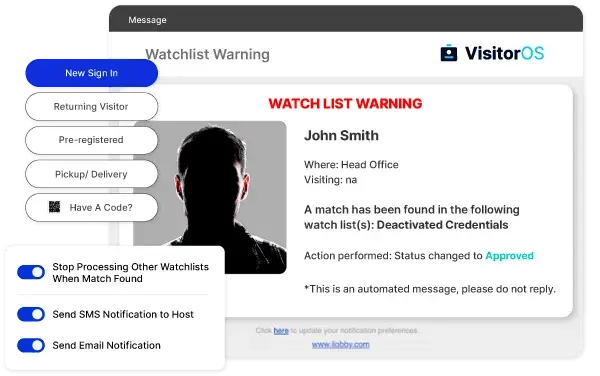
VisitorOS is the FacilityOS visitor management platform. Its watchlist functionality checks visitors against third-party and custom internal lists, delivers real-time alerts, and can automatically deny entry on a match. Each capability below maps to a specific part of the screening workflow.
How Watchlist Screening Works in VisitorOS
- Admin setup. Administrators configure watchlists by integrating external databases into VisitorOS or by building custom internal lists that match the site's security needs.
- Visitor check-in. When a guest pre-registers or checks in at the kiosk, VisitorOS automatically cross-references their information against both external and internal lists.
- Real-time alerts. A match triggers an immediate alert so the security team can take informed action before the visitor proceeds.
Automated Screening at Sign-In
VisitorOS checks every visitor against the configured lists during pre-registration or at the kiosk, which removes the manual security check from reception and applies the same standard to each guest. Because the check runs in seconds, screening does not slow down visitors who clear, and it concentrates attention on the exceptions that need it.
Real-Time Alerts and Automated Actions
When the system detects a match, it can deny badge printing, notify security officers and administrators, send alerts, and store a digital log of the attempted entry. Combined with access control integrations, a flagged visitor can be held rather than admitted, which gives the site a controlled front door.
Pre-Registration Watchlist Hold
VisitorOS can hold flagged visitors for approval during pre-registration, so a potential match is reviewed before the visitor ever reaches the site. This moves the screening decision off the lobby floor and closes the gap where a flagged guest arrives unannounced.
Logged Records for Every Check
Every screening event is recorded and attached to the visitor log, which makes compliance reporting and audits faster. When an inspector asks for proof that screening happened, the documentation is retrievable by visitor or by date without searching paper binders.
The FacilityOS & Checkr Trust Partnership
VisitorOS delivers its third-party criminal and risk screening through a partnership with CheckrTrust. CheckrTrust provides real-time screening and risk intelligence and is part of Checkr, one of the largest background check companies in the US, which processes more than 30 million background checks per year.
That scale is what makes real-time visitor screening workable. CheckrTrust draws on more than 2,400 sources, and because its data and risk signals are built in advance, a check against them returns in about a second. The partnership also applies identity-matching that looks beyond a name alone, using details such as date of birth and phone history to confirm whether a record belongs to the visitor checking in, which reduces false matches on common names.
Recent VisitorOS releases have deepened the integration. Watchlist hit email notifications powered by CheckrTrust let teams choose how much detail an alert includes, ranging from full criminal history to a simplified summary, which balances speed, context, and privacy. On the privacy side, screening data can be discarded once a check is complete, which limits how long personal information is retained.
Who Benefits and How
Automated watchlist screening changes the day-to-day for several roles. Each gains a specific, verifiable benefit from the same workflow.
Security Managers

Security managers gain a controlled front door, since access stays gated until screening clears. Real-time alerts and accurate matches let them identify a flagged visitor and act before entry, rather than relying on a receptionist's judgment in a high-stress moment.
EHS Managers

EHS managers benefit from automated monitoring that supports safety and security standards. Proactive identification of flagged individuals helps maintain a safer environment for employees and visitors without adding manual checks to the process.
Facility and Operations Managers

Facility and operations managers get full visibility into visitor activity with less manual effort. Screening runs through pre-registration and the kiosk, so throughput holds up during busy periods and the record of who was screened stays consistent across sites and shifts.
Frequently Asked Questions
Does watchlist screening slow down check-in?
Not for visitors who clear. Checks run in about a second, so the sign-in experience stays fast. Screening is designed to slow down only the exceptions, where a match warrants review before entry. Running checks during pre-registration moves the work ahead of arrival, so a flag can be resolved before the visitor reaches the building.
How does VisitorOS handle a watchlist match?
When VisitorOS detects a match, it can deny badge printing, notify security officers and administrators, send real-time alerts, and store a digital log of the attempted entry. With pre-registration watchlist hold enabled, a flagged visitor is held for approval before arrival, and with access control integrations, access can stay gated until the match is reviewed.
What does the Checkr Trust partnership add to VisitorOS screening?
VisitorOS delivers third-party criminal and risk screening through Checkr Trust, which is part of Checkr and processes more than 30 million background checks per year. Checkr Trust draws on more than 2,400 sources with pre-built risk signals, which is what allows a check to return in about a second. Identity matching uses details beyond the name, such as date of birth and phone history, to reduce false matches on common names.
Can a facility screen visitors against its own internal lists?
Yes. VisitorOS supports custom internal watchlists alongside third-party databases, so a site can flag individuals it has specific reasons to monitor, such as someone previously removed from the property. Both list types are checked during the same sign-in process.
This page provides general guidance on visitor watchlist screening and is not legal advice. Confirm screening and compliance requirements with your compliance and legal teams.
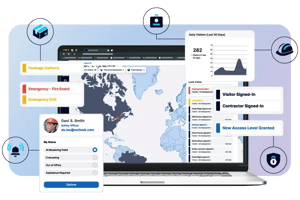 Streamline Your Visitor Program
Streamline and automate your visitor management operations to achieve ITAR regulatory compliance, enforce safety protocols, and drive site security requirements.