
Visitor management software started as a simple digital replacement to a paper sign-in sheet.
Today, it sits at the center of security, compliance, and workplace operations. The category has grown into a $1.9B+ market, driven by rising security expectations, hybrid work, and compliance requirements. At the same time, buyer expectations have shifted. Around 87% of teams now rank self check-in and tracking as critical features when evaluating solutions.
That shift is important. It means visitor management is no longer just about capturing a name and time of entry. It is about understanding who is on-site, ensuring the right processes are followed, and having records ready when they are needed.
This guide breaks down the top visitor management systems in 2026, based on G2 comparisons and vendor positioning. We start with simpler tools and move toward platforms designed for more complex, multi-site environments.
The ten platforms covered: Lobbytrack, SwipedOn, Visitly, Archie, Verkada Guest, Sign In Solutions, The Receptionist, Eptura Visitor, Envoy Visitors, and FacilityOS’s VisitorOS. Continue reading on below for an in-depth review of each or skip down to the comparison tables below.
How We Evaluated These Tools
To make this comparison useful, we looked at the criteria that consistently show up in G2 and Info-Tech Research reviews and buyer evaluations. All ratings and scores referenced in this guide are sourced from G2 as of Q2 2026, supplemented by Info-Tech Research.
- Ease of use
How intuitive the check-in and admin experience is - Compliance and audit readiness
Ability to maintain clean, exportable records - Workflow flexibility
Support for approvals, custom visitor types, and policies - Integrations
Connections to access control, contractor compliance, Microsoft, Slack, and other workplace operations systems - Multi-site visibility
Centralized oversight across locations - Total cost of ownership
How pricing scales with features and locations
 The 10 Best Visitor Management Systems (2026)
#10 Lobbytrack
Best for: Simple visitor tracking
Lobbytrack is a lightweight visitor management tool for teams that need basic digital check-in without complex workflows or multi-site requirements. On G2, it scores 92% for ease of use and 93% for likelihood to recommend.
Lobbytrack is often evaluated by small teams looking to replace paper sign-in sheets without adding admin overhead.
What it does well:
- Digital sign-in and visitor logs
Captures basic visitor details and maintains a simple log for reception and basic oversight. - Straightforward front desk workflows
Keeps check-in steps minimal, which works well for predictable visitor flows. - Simple rollout for single sites
Works best when there is one location and limited compliance or reporting complexity.
Common limitations buyers flag:
- Limited reporting depth
Basic systems can fall short when teams need audit-ready exports, filters, or recurring compliance reports. - Fewer workflow and policy options
Lightweight tools often cannot support custom documents, role-based approvals, or visitor type-specific flows. - Weaker integration coverage
As requirements expand into access control or broader operations tooling, simple platforms often require workarounds.
Lobbytrack is usually the better fit when a team wants the simplest possible visitor log, and less ideal when the priority is scaling workflows, reporting, or integrations.
🔎 Quick Questions a Buyer Should Ask:
- Do you need custom visitor types, documents, or approvals, or just a basic sign-in?
- How often do you need to export visitor logs for audits or internal reporting?
- Will you need integrations beyond email and basic notifications as you scale?
- If you add a second site, will reporting and configuration still be manageable?
#9 SwipedOn
Best for: Quick rollout in straightforward environments
SwipedOn is built for teams that want a clean sign-in experience with minimal setup. It is positioned as a cost-conscious tool for basic visitor management, with desk and resource booking features for office environments.
SwipedOn is commonly evaluated when visitor management is primarily a front desk workflow and requirements are expected to stay simple.
What it does well:
- Digital visitor sign-in
Covers the core check-in flow for guests and day-to-day reception needs. - Simple front desk notifications
Supports notifying hosts and keeping the check-in experience moving quickly. - Easy setup for low complexity sites
Works best when workflows, policies, and reporting requirements are minimal.
Common limitations buyers flag:
- Support and customization gaps
Customers report inconsistent support experiences and limited help when issues arise, especially when workflows need to be tailored. - Limited emergency and evacuation features
SwipedOn’s evacuation mode is described as limited and unreliable in more complex scenarios, particularly across zones or when offline. - Cookie cutter configuration
Teams cite limited customization and difficulty scaling workflows as operational requirements grow. - Reporting limitations
Some customers report challenges exporting data and limited access to real-time or customizable reporting for audits and compliance.
SwipedOn is usually the better fit when the priority is an affordable, basic check-in experience, and less ideal when a team needs deeper customization, stronger support, or more robust reporting.
🔎 Quick Questions a Buyer Should Ask:
- How important is it to customize visitor flows and documents to your compliance requirements?
- What happens when you need a report quickly for an audit or internal review?
- How reliable does evacuation mode need to be across zones, devices, and offline scenarios?
- If something breaks, what is your expectation for support response time?
#8 Visitly
Best for: Lightweight office check-in
Visitly is a cloud-based visitor management solution designed for straightforward office environments. On G2, it shows a 12-month ROI payback period and a 1-month implementation timeline, along with 91% for ease of use and 88% for likelihood to recommend.
Visitly is typically evaluated by teams that want a simple, reliable way to modernize check-in without building complex processes around compliance, reporting, or multi-site operations.
What it does well:
- Digital visitor sign-in
Modernizes front desk sign-in with a simple, repeatable workflow. - Badge printing and host notifications
Supports the core visitor experience needs most offices prioritize. - Lightweight visitor logs
Keeps basic records without requiring heavy administration.
Common limitations buyers flag:
- Limited workflow flexibility
Lightweight tools often struggle to support custom documents, approvals, and visitor-type specific requirements. - Reporting depth can be constrained
Exporting data for audits or trend analysis can require more manual steps or may not meet stricter needs. - Less suited for multi-site operations
As teams add sites, standardization and centralized oversight can become harder to manage.
Visitly is usually the better fit when visitor management needs to stay lightweight, and less ideal when compliance workflows, reporting requirements, or multi-site visibility become priorities.
🔎 Quick Questions a Buyer Should Ask:
- Do you need custom policies, NDAs, or approvals at check-in?
- How often do you need audit-ready exports, and how granular do they need to be?
- Will multiple locations need centralized admin and reporting?
- Are integrations a future requirement or a current requirement?
#7 Archie
Best for: Hybrid workplaces
Archie is a workplace management platform that combines visitor check-in with desk booking and space management, designed for teams that want both functions in one tool. On G2, it scores 93% for ease of use, 94% for meets requirements, 93% for visitor database, and 89% for reporting, with an average implementation time of 1 month and support satisfaction of 95%.
Archie is often evaluated when visitor sign-in is one part of a broader workplace experience, not a standalone compliance or security program.
What it does well:
- Visitor check-in plus workplace tools
Combines visitor workflows with desk booking and space management in one platform. - Strong end-user experience
Designed for adoption in hybrid offices where usability is a top priority. - Workplace oriented reporting
Supports reporting geared toward space and workplace administration needs.
Common limitations buyers flag:
- Less purpose-built for regulated environments
Workplace platforms often have gaps when teams need strict compliance workflows and audit-ready controls. - Workflow depth can be the decision point
Organizations with complex visitor types, approvals, and documentation requirements may need more than a workplace tool provides. - Not optimized for operational sites
Facilities, EHS, and security teams often need different controls and reporting than office-first platforms prioritize.
Archie is usually the better fit when workplace experience and space management are core needs, and less ideal when visitor management must serve compliance heavy or operational environments.
🔎 Quick Questions a Buyer Should Ask:
- Is visitor management a front desk experience, or part of a compliance program?
- Do you need approvals, custom documents, and visitor types for different risk categories?
- Will reporting need to support audits, not just workplace ops?
- Are you buying a workplace platform, or a visitor platform?
#6 Verkada Guest
Best for: Teams already standardized on Verkada security hardware
Verkada Guest is a visitor management add-on designed to work within the Verkada camera and access control ecosystem. It is most often evaluated by organizations that already run Verkada’s security stack and want visitor sign-in to live alongside it.
Verkada Guest is commonly considered when hardware consolidation and ecosystem alignment are the top buying criteria.
Note: Verkada Guest is an add-on to the Verkada security platform, which is why it ranks at #6 here. For organizations already standardized on Verkada, it can be a straightforward way to add visitor sign-in.
What it does well:
- Tight alignment with Verkada’s ecosystem
Works naturally for teams already using Verkada cameras and access control. - Basic visitor sign-in and logs
Covers core check-in and recordkeeping needs without a complex setup. - Convenience for existing Verkada buyers
Can be attractive when procurement is centered on a bundled security stack.
Common limitations buyers flag:
- Customization and workflow gaps
Verkada is often described as limited in visitor experience configurability, especially for regulated workflows. - Surface level reporting
Teams cite constraints in audit-ready reporting and automation compared to purpose-built visitor platforms. - All or nothing ecosystem dynamics
Buyers may need to adopt more of Verkada’s stack to get the experience they want, which can limit interoperability. - Security history concerns
Verkada’s prior breach remains a consideration in some cybersecurity reviews and vendor risk assessments.
Verkada Guest is usually the better fit when a team wants a bundled visitor tool inside the Verkada stack, and less ideal when the priority is deep workflow customization, audit-ready reporting, or flexibility with third-party systems.
🔎 Quick Questions a Buyer Should Ask:
- Do you need your visitor tool to integrate with non-Verkada systems?
- How important are audit-ready reports and reporting automation?
- Do you need role-based workflows and custom visitor experiences by site or visitor type?
- How does your IT team evaluate vendor security history and certifications?
#5 Sign In Solutions
Best for: Compliance-focused enterprise visitor management
Sign In Solutions is a visitor management platform often chosen for compliance documentation, policy acknowledgment, and structured visitor record keeping. On G2, it scores 91% for ease of use and 93% for likelihood to recommend, with an average implementation time of 2 months and ROI payback of 15 months.
Sign In Solutions is commonly evaluated by organizations that want more structure than a lightweight front desk tool, especially in regulated environments where audit trails matter.
What it does well:
- Structured visitor logs
Captures and maintains consistent records of visitor activity for compliance and oversight. - Policy acknowledgments and documentation
Supports policy sign-offs and documentation capture as part of the check-in flow. - Consistent record keeping for audits
Keeps visitor records organized for audits and internal reporting needs.
Common limitations buyers flag:
- Hardware reliability and kiosk overhead
Teams cite iPad outages, sync issues, and limited remote device management, which can create front desk disruption and extra IT work. - Support experience can be inconsistent
Feedback commonly points to slower response times and less guided troubleshooting during rollout or when issues arise. - Admin UI can feel bloated
Admins often describe the interface as harder to navigate than simpler VMS tools, especially as workflows and locations scale. - Reporting can take work to operationalize
Teams may need manual steps to extract the exact reports needed for audits and internal stakeholders.
Sign In Solutions is usually the better fit when a team’s priority is compliance documentation and visitor logs, and less ideal when the priority is minimizing kiosk downtime, keeping admin overhead low, and pulling reports quickly without manual work.
🔎 Quick Questions a Buyer Should Ask:
- If a kiosk goes offline, how quickly can you recover without IT involvement?
- Who owns iPad updates, troubleshooting, and replacements?
- How fast can you pull an audit-ready report for a specific site, date range, and visitor type?
- How many clicks does it take to make common admin changes (fields, workflows, permissions)?
#4 The Receptionist
Best for: Ease of use across small to mid-sized offices
The Receptionist is a visitor management tool built for simplicity, commonly deployed in small to mid-sized corporate offices. On G2, it scores 91% for visitor database management, 87% for reports and analytics, and 72% for badge issuance.
The Receptionist is often evaluated when the main goal is a clean, basic check-in experience at a low price point.
What it does well:
- Simple front desk check-in
Designed to be easy for reception teams to run without much training. - Lightweight visitor log and notifications
Covers core office use cases for tracking guests and alerting hosts. - Low cost entry point
Can be attractive for single-site offices with minimal compliance requirements.
Common limitations buyers flag:
- Unstable hardware and offline issues
Devices crashing, WiFi disconnects, and manual updates can create downtime and operational friction. - Rigid and confusing admin experience
Teams cite an unintuitive backend that is difficult to configure and frustrating for reporting, especially during audits. - Pricing model can penalize growth
Per-user pricing can become costly as headcount grows even if visitor volume stays similar. - Limited product vision beyond basic check-in
Positioned as a point solution with limited emergency readiness and no contractor compliance solution.
The Receptionist is usually the better fit when the requirement is basic sign-in at a low price, and less ideal when reliability, reporting, and scalability are priorities.
🔎 Quick Questions a Buyer Should Ask:
- What happens operationally when the kiosk drops offline or needs updates?
- How often do you need to pull reports for audits or compliance reviews?
- Will pricing stay predictable as the organization grows?
- Do you expect to add more workflows beyond basic visitor check-in over time?
#3 Eptura Visitor
Best for: Organizations that want visitor management inside a broader workplace suite
Eptura Visitor (formerly ProxyClick) is commonly evaluated by teams that want visitor management as part of a wider workplace and facilities platform. It is often included in broader workspace RFPs where visitor management is one line item among many.
Eptura Visitor is typically considered when hot desking or space management sits alongside visitor management requirements.
What it does well:
- Workplace suite positioning
Appeals when a buyer wants visitor management bundled into a broader workplace experience platform. - Security-oriented feature set in the category
Often positioned around features like facial recognition and an integration marketplace. - Standard visitor check-in workflows
Supports core visitor management requirements for office and workplace environments.
Common limitations buyers flag:
- Downtime and reliability issues
Customers report outages and access problems, including declines in reliability post-acquisition. - Customer support concerns
Feedback includes long ticket cycles, lack of phone access, and slower resolution for billing or technical issues. - Pricing increases and unexpected hikes
Some customers cite annual increases and higher cost relative to perceived value. - Weak reporting capabilities
Teams report difficulty pulling simple reports and frustration during audits.
Eptura Visitor is usually the better fit when visitor management is part of a wider workplace platform decision, and less ideal when reliability, support responsiveness, and audit-friendly reporting are the priority.
🔎 Quick Questions a Buyer Should Ask:
- If you have an outage, what is the expected response and resolution path?
- How important is phone access and real-time support to your evaluation?
- How easily can you pull audit-ready reports without manual work?
- Is visitor management a core requirement, or a secondary requirement in a broader suite purchase?
#2 Envoy Visitors
Best for: Modern offices prioritizing user experience
Envoy Visitors is a visitor management platform designed for corporate office environments, built around a polished interface and quick deployment. On G2, it scores 95% for support and 89% for reports and analytics, with an average implementation time of 2 months, ROI payback of 19 months, and a customer renewal rate of 88%.
Envoy is commonly evaluated when front desk experience, brand familiarity, and workplace workflows are key priorities.
What it does well:
- Clean, intuitive user experience
Strong fit for offices that prioritize a modern check-in flow and fast adoption. - Fast initial deployment
Designed to launch quickly in standard office environments. - Broad workplace fit
Often evaluated alongside desk booking and workplace experience needs.
Common limitations buyers flag:
- Can feel overpriced for the value delivered
Customers cite higher pricing relative to usage, plus add-on costs such as per-user pricing for emergency notifications. - Less fit for regulated environments
Workflows can fall short when sites require custom compliance documentation and stricter controls. - Support and responsiveness concerns
Some customers report slower, less flexible support during setup or when issues arise. - Limited reporting capabilities for audits
Exporting data and pulling compliance-ready reports can be a pain point.
Envoy is usually the better fit for corporate offices prioritizing a polished visitor experience, and less ideal when compliance workflows and audit-ready reporting are primary decision drivers.
🔎 Quick Questions a Buyer Should Ask:
- Do you need custom compliance workflows, documents, and approvals at check-in?
- How often will you need to export data for audits, and how fast does that need to be?
- Are add-on costs (like per-user emergency features) acceptable as you scale?
- What level of support do you expect during rollout and ongoing operations?
#1 FacilityOS's VisitorOS
Best for: Facilities, compliance, and operational visibility
FacilityOS’s VisitorOS solution is a visitor management system built for operational and regulated facilities that need multi-site visibility, compliance workflows, and real-time reporting. On G2, it scores 94% for ease of use, 96% for visitor database, 97% for partnering, and 98% for product direction, with an average ROI payback of 10 months and a 100% customer renewal rate.
FacilityOS takes a different approach by focusing on how visitor management fits into broader operations.
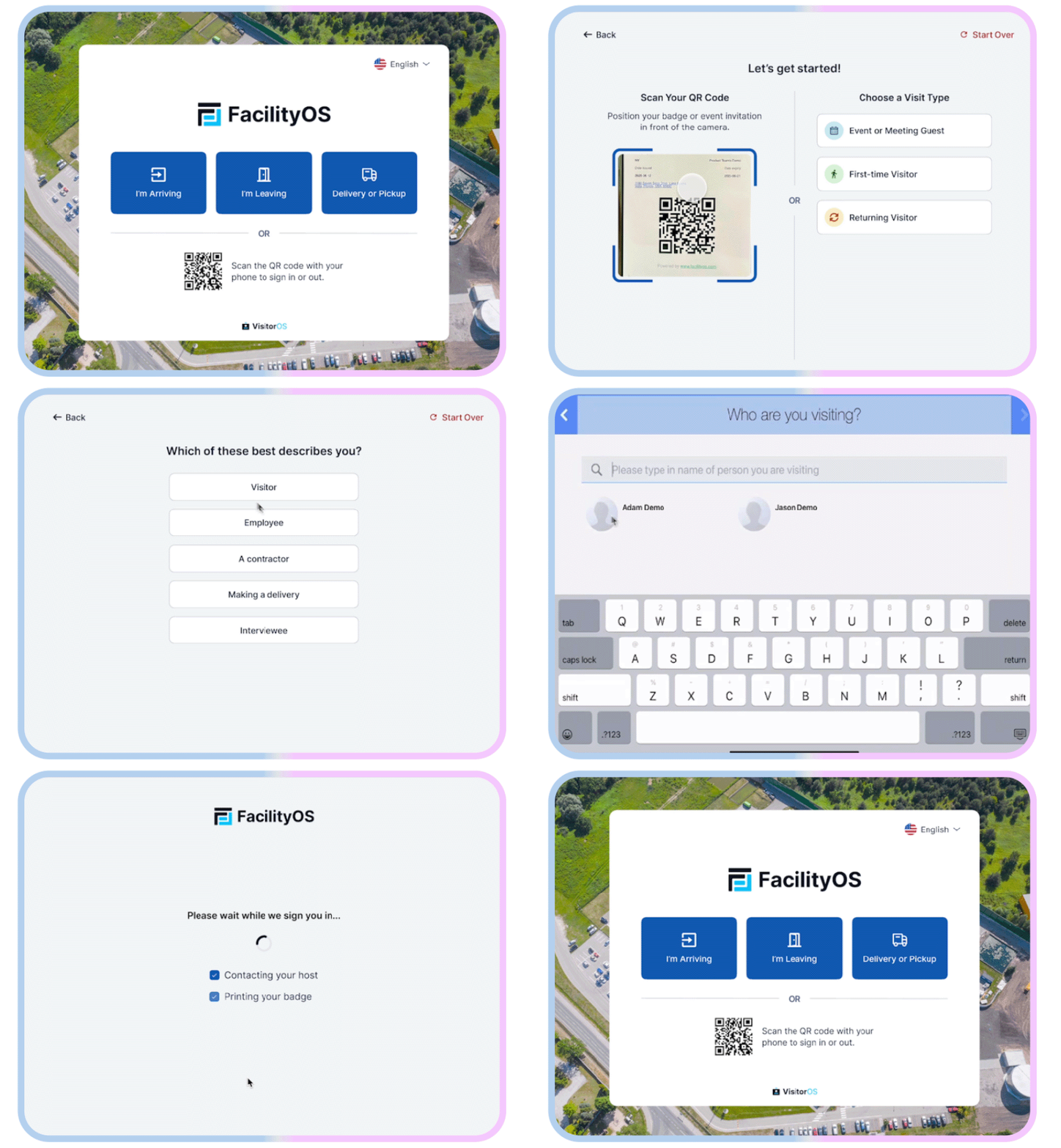
What FacilityOS does well:
- Operational visibility across sites
Real-time view of who is on-site, across locations, with centralized dashboards and reporting. - Compliance-ready workflows
Configurable visitor types, policy acknowledgments, and audit trails designed for regulated environments. - Reliable, supported rollout
White-glove onboarding plus responsive support so the system is configured correctly from day one. - Hardware included and managed
Preconfigured, MDM-enrolled iPads with monitoring, remote troubleshooting, and replacements to reduce downtime and IT overhead. - Customer support
Consistently highlighted as responsive and hands-on, especially during onboarding and scaling - Visitor database and reporting Strong capabilities for tracking, exporting, and analyzing visitor data across all sites
- Workflow customization
Highly configurable to match how each site actually operates, including visitor types, routing, approval steps, and policy requirements - Native integrations
Connects directly with access control systems, emergency and evacuation management, and contractor compliance management, so visitor data flows into the systems already running your facility operations
Rather than acting as a standalone check-in tool, FacilityOS’s VisitorOS is built to support how facilities, EHS, security, compliance, IT, and operations teams work every day.
Best Fit When:
- Visitor management is part of broader site operations, not just lobby check-in
- Compliance and record keeping need to stay audit-ready without manual work
- Multiple sites need standardized workflows with local flexibility where needed
- You need real-time visibility into who is on-site and where
- You want a turnkey rollout (hardware, onboarding, support) with minimal lift
Research shows that over 82% of large organizations rely on visitor management software for tracking, compliance, and automation. As requirements grow, the platforms built for that operational layer become the clear choice.
FacilityOS’s VisitorOS is built for exactly that. Learn how VisitorOS works!
Side-by-Side Comparison
Here is how a selection of these platforms compare across key G2 metrics (sourced from G2 as of Q1 2026):
| Platform | Best For | G2: Ease of Use | G2: Likelihood to Recommend | G2: Product Direction | Avg. ROI Payback | Renewal Rate |
|---|---|---|---|---|---|---|
| FacilityOS’s VisitorOS | Multi-site facilities, compliance, operational visibility | 94% | 94% | 98% | 10 months | 100% |
| Envoy Visitors | Corporate offices, front-desk UX | 94% | 94% | 96% | 19 months | 88% |
| Visitly | Lightweight office check-in | 91% | 88% | N/A | 12 months | N/A |
| Eptura Visitor | Structured enterprise security workflows | 91% | 92% | 87% | 14 months | N/A |
| The Receptionist | SMB offices, ease of use | N/A | N/A | 96% | N/A | N/A |
| Sign In Solutions | Compliance-focused enterprise | 91% | 93% | 95% | 15 months | N/A |
| Archie | Hybrid workplaces | 93% | 92% | N/A | N/A | N/A |
| SwipedOn | Quick rollout, basic check-in | N/A | N/A | 94% | 14 months | N/A |
| Lobbytrack | Simple single-site check-in | 92% | 93% | N/A | N/A | N/A |
Feature & Capability Comparison
Not all platforms cover the same ground. This table shows which capabilities are available across the seven platforms reviewed, based on publicly available product information and G2 data. Verify specific capabilities with each vendor before purchasing (scroll to the right to see more of the table).
| Capability | FacilityOS’s VisitorOS | Envoy Visitors | Visitly | Eptura Visitor | The Receptionist | Sign In Solutions | Archie | SwipedOn | Lobbytrack |
|---|---|---|---|---|---|---|---|---|---|
| Digital check-in & pre-registration | ✓ | ✓ | ✓ | ✓ | ✓ | ✓ | ✓ | ✓ | ✓ |
| Visitor logs & audit trails | ✓ | ✓ | ✓ | ✓ | ✓ | ✓ | ✓ | ✓ | ✓ |
| Badge printing & issuance | ✓ | ✓ | ✓ | ✓ | ✓ | ✓ | ~ | ✓ | ✓ |
| Host notifications | ✓ | ✓ | ✓ | ✓ | ✓ | ✓ | ✓ | ✓ | ✓ |
| NDA & policy acknowledgment | ✓ | ✓ | ~ | ✓ | ✓ | ✓ | ~ | ~ | ~ |
| Watchlist / blacklist screening | ✓ | ~ | ✗ | ~ | ~ | ~ | ✗ | ✗ | ✗ |
| Advanced reporting & analytics | ✓ | ~ | ~ | ~ | ~ | ~ | ~ | ✗ | ✗ |
| Multi-site management | ✓ | ~ | ~ | ~ | ✗ | ✗ | ~ | ✗ | ✗ |
| Access control integrations | ✓ | ✓ | ~ | ~ | ~ | ~ | ✗ | ✗ | ✗ |
| Managed / turnkey hardware | ✓ | ✗ | ✗ | ✗ | ✗ | ✗ | ✗ | ✗ | ✗ |
| Emergency & evacuation management | ✓ | ✗ | ✗ | ~ | ✗ | ✗ | ✗ | ~ | ✗ |
| Contractor compliance management | ✓ | ✗ | ✗ | ✗ | ✗ | ✗ | ✗ | ✗ | ✗ |
✓ = available, ~ = limited or partial, ✗ = not available. Based on G2 and publicly available product information as of June 2026.
What Is Visitor Management Software?
Visitor management software is a digital system that replaces paper sign-in sheets with structured check-in workflows, automated notifications, and searchable visitor records. It helps organizations track who is on-site, enforce entry policies, and maintain audit-ready logs across one or more facilities.
Most modern systems include:
- Digital check-in and pre-registration
- Visitor logs and reporting
- Badge printing
- Notifications to hosts
- Compliance and policy acknowledgment
More advanced platforms extend beyond this, connecting visitor data to access control systems, workplace tools, integrated watchlists for visitor screening, and operational reporting.
How Visitor Management Software Solutions Differ
Not all visitor management systems are built with the same priorities.Some tools are designed to optimize the front desk experience. Others are built to support broader operational needs across facilities, security, and compliance teams.
Most platforms fall somewhere along this spectrum:

Front desk-focused tools
- Designed for speed and simplicity at check-in
- Often prioritize user experience and quick setup

Operations-focused platforms
- Designed to support compliance, reporting, and multi-site visibility
- Often used by facilities, EHS, and security teams
The distinction is less about complexity and more about what happens after a visitor signs in.
Many modern platforms aim to balance:
- Fast to deploy
- Easy to use day-to-day
- While still supporting deeper operational visibility and reporting
That combination is becoming more important as organizations scale and requirements grow.
Visitor Management Software Pricing
Pricing varies widely depending on features, number of locations, and compliance requirements. Many platforms price per location, which can significantly impact total cost as organizations scale.
Typical Ranges:
Entry-level tools
~ $100 to $200 per month (per location)
Basic check-in, limited workflows, and fewer integrations.
Mid-tier platforms
~ $200 to $400 per month (per location)
More customization, integrations, and reporting capabilities.
Enterprise solutions
$400+ per month (per location), often custom pricing
Multi-site management, compliance workflows, and advanced reporting.
Cost tends to increase based on:
- Number of locations
- Required integrations (access control, workplace tools)
- Level of compliance and security requirements
- Feature tiers and add-ons
Key Visitor Management Software Features
While features vary, a few consistently matter across industries:
- Pre-registration and self check-in
Reduces wait times and improves visitor flow - Compliance and audit trails
Ensures records are complete and exportable - Visitor data dashboard
See who is on-site across locations
Choosing the Right Fit for Your Team
Visitor management has expanded well beyond the lobby. It now sits at the intersection of security, compliance, and facility operations.
The tools in this guide all handle check-in. Where they diverge is in what they support after a visitor signs in: whether records are audit-ready, whether data is visible across locations, and whether the system can grow with the organization.
Not sure where your requirements fall? Book a quick 15-minute walkthrough to see if VisitorOS is right for you!
Book a 15-minute Walkthrough
Stay updated with industry insights, success stories, and more. Follow us on social media for the latest FacilityOS content.
 Follow us on Facebook
  Follow us on X
 Follow us on LinkedIn