
Regulated facilities face a recurring decision at the front door: how much of a visitor's safety and compliance process happens when they arrive, and how much happens before. Both approaches work. The deciding factor is whether a given step is long enough, or sensitive enough, that finishing it ahead of the visit keeps the lobby moving and the entry record complete.
Pre-screening covers that ground. When safety training, document signing, and screening are completed before a visitor reaches the site, check-in confirms a finished record instead of starting one. This guide walks through what visitor safety and compliance involves, which steps tend to move best to pre-arrival, and how a digital visitor management system handles the workflow end to end.
What is Visitor Safety and Compliance?
Visitor safety and compliance is the set of steps that confirm everyone entering a site is identified, trained on site-specific safety protocols, and bound by any required legal acknowledgments such as NDAs and facility agreements. It can cover identity verification, safety training, document sign-off, access control, and the documentation that proves each step happened. Strong visitor onboarding completes these steps before a badge is issued.
The record matters as much as the steps. A site that can show who entered, what training they completed, what they signed, and who approved them has the documentation auditors and regulators look for. That same record supports liability questions after an incident and confirms access stayed limited to cleared individuals.
What Do Facilities Require Before Approving a Visitor?
Most regulated sites require about three things from a visitor before entry is approved. The exact mix depends on the site and the visitor type.
- Safety training: Site-specific safety or induction content in the formats most facilities already use: videos, documents to read and sign, and quizzes that confirm comprehension. Completion is logged for each visitor.
- NDA and document sign-off: NDAs, safety guidelines and handbooks, and facility-specific agreements signed before entry is approved.
- Screening and host approval: Government ID verification, watchlist screening, and health screening confirm identity and risk, and host approval is verified before a badge is issued.
These requirements are set per visitor type, not once for the whole facility. A site can require pre-arrival completion for scheduled contractors while letting walk-ins and short-notice guests finish at arrival.

Should These Steps Happen at Arrival or Before?
Both timings are valid, and most sites mix them. The right choice depends on how long the step takes and how strict the requirement is.
Pre-arrival suits long or sensitive requirements. Multi-hour safety training, watchlist screening, and health screening fit here, because finishing them in advance means a visitor can be reviewed and approved before they reach the site. At-arrival suits short steps such as a quick signature or a brief onboarding video, which a visitor can complete at the kiosk without a meaningful delay.
For example, subcontractors who need hours of safety training can finish it ahead of the scheduled work date, so a long induction does not delay the job or back up the lobby. When passport or watchlist checks run before arrival, the host can pre-approve the visitor in advance, which supports requirements like ITAR where a US person can be screened and cleared before reaching a controlled area. Whichever timing applies, a digital workflow logs every step and applies the same requirements to each visitor.
How to Pre-screen & Safety-onboard Visitors Before They Arrive
The workflow below uses a digital visitor management system with advanced pre-registration. Each step moves a requirement off the lobby floor and into the record before the visitor arrives.
-
Define Requirements By Visitor Type
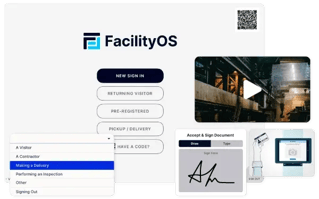
Start by mapping requirements to visitor types: contractors, inspectors, vendors, interview candidates, and returning guests each carry a different mix of training, documents, and checks. A visitor type sets which videos, documents, quizzes, and screenings apply, so the system requests only what that category needs. -
Send a Pre-Registration Invite
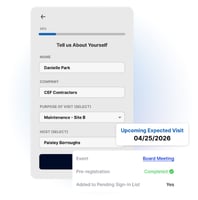
The host sends a pre-registration invite from their work email, and the visitor receives a secure link to a sign-in portal. The visitor completes the requirements remotely on their own device, with no app to download. This also lets staff collect details such as company, contact information, certifications, and citizenship data ahead of the visit. - Deliver Safety Training in Advance
.webp?width=365&height=200&name=VOS-safety-training-img%20(1).webp)
Assign the required videos, documents, and quizzes to each visitor type and deliver them before the scheduled visit. Visitors complete the training on their own time, and the system logs each completion. Moving safety training into pre-registration matters most for high-risk sites, for example, construction inductions often run 30 to 40 minutes and would otherwise hold up the front desk. - Collect NDA & Document Signatures
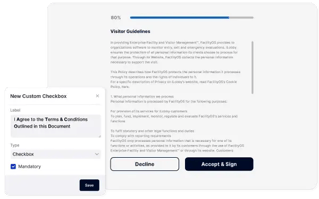
Attach NDAs, handbooks, and facility-specific agreements to the visitor type and deliver them during pre-registration. Visitors review and sign digitally before arrival, and signed copies attach to their visitor log. Configurable document cadences, such as re-acknowledgment every six months, keep recurring visitors current without manual tracking. - Run Screening & Watchlist Checks
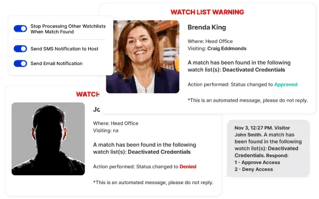
Screen pre-registered visitors against custom and third-party watchlists, and verify ID, citizenship, or health details where the site requires them. Screening can run natively in the system or through an integration with screening software a site already trusts. Because results arrive before the visit, security teams can flag a concern while there is still time to act on it. - Review & Approve Access in Advance
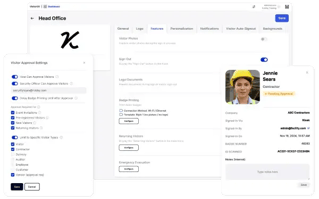
When pre-registration approval is enabled, a visitor who meets the approval criteria is held as pending and does not receive a QR code until an approver reviews their details, screening results, and signed documents. Approvers act from an emailed review, and every approval or denial is recorded in the visitor log. This gives the site a controlled front door where access stays gated until each requirement is met. - Confirm the Record at Check-In
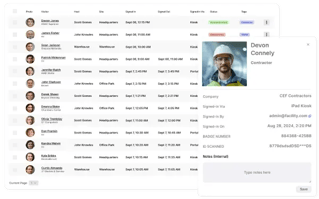
With the work already done, arrival becomes a confirmation step. The visitor scans their QR code at the kiosk, the system prints a badge, and the host is notified. A visitor who arrives with an outstanding item finishes it at the kiosk before proceeding, so the requirement is still met before entry.
Why Completing These Steps in Advance Matters
Pre-screening changes where the work happens, not whether it happens. Three outcomes follow from moving long or sensitive steps ahead of the visit.
It Protects the Site's Liability & Audit Position
A complete digital record of training, signatures, and approvals gives staff audit-ready documentation in one place, which is harder to assemble from paper logs or partial records. When an incident or inspection raises questions, the log shows what each visitor completed and who approved them.
It Supports Controlled Access in Higher-Risk Environments
Screening and watchlist results reviewed before arrival mean an unverified visitor never receives a badge, and access to sensitive areas stays limited to cleared individuals. For sites under standards such as ITAR or OSHA, that advance review is often what makes the requirement workable.
It Removes Time Pressure From the Lobby
Training a contractor on the spot can take an hour or more, and running those sessions as people arrive creates scheduling conflicts. For example a global leader in process technologies, Valmet, integrated safety orientations into the check-in process and reduced contractor training time by more than 90%, from up to an hour per contractor to about five minutes.
The Benefits of Pre-Screening Visitors
- Audit-Ready Records
Completed documents and training logs attach to each visitor's record, which simplifies compliance reporting and inspections. - Controlled, Gated Access
No badge is issued until screening, training, and signatures are complete, which keeps unverified visitors out of restricted areas. - Faster, Calmer Check-In.
Visitors arrive with requirements finished, so entry points stay clear and reception avoids running sessions on the spot. - Consistent Enforcement.
The same requirements apply to every visitor of a given type, regardless of who staffs reception or which shift they arrive on. - Less Administrative Load.
Visitors complete documents and training themselves, which frees staff from manual logbooks and repeat data entry.
How VisitorOS Supports Visitor Pre-Screening & Onboarding
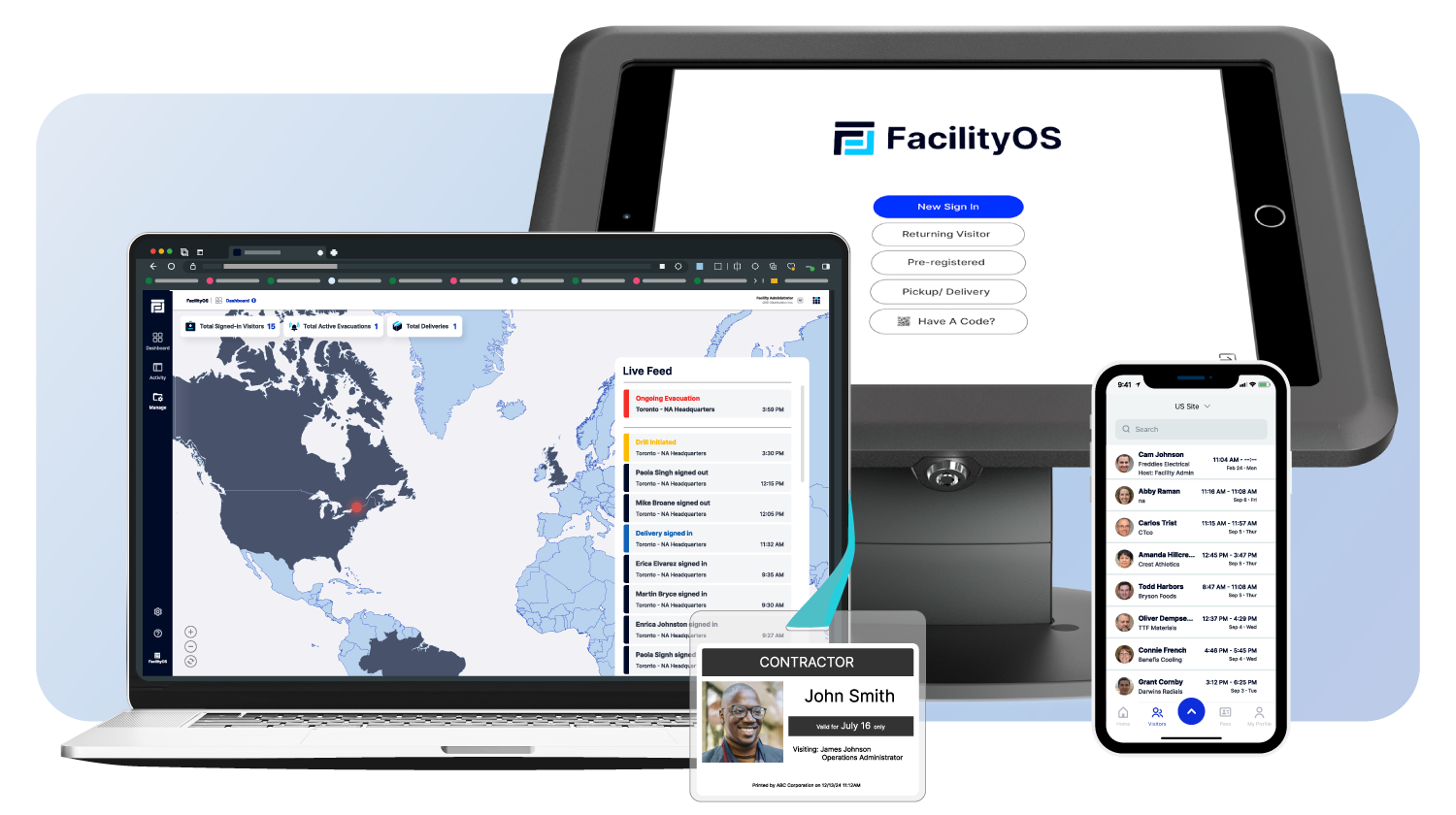
VisitorOS is FacilityOS's visitor management platform, and it handles onboarding both before arrival and at check-in so each visitor type completes its steps on the timing that fits. The capabilities below map to the gaps a pre-screening workflow needs to close.
- Safety training in video, document, and quiz formats, assigned by visitor type and completed during pre-registration or at the kiosk, with each completion logged. Updated materials are uploaded to the backend and become available at the next check-in.
- NDAs and legal documents delivered by visitor type, signed digitally before arrival, and stored on the visitor log with configurable cadences and retention.
- Screening that covers identity and ID verification, watchlist screening, and health screening, run natively or through an integration with the screening software a site already uses.
- Advanced pre-registration that invites guests ahead of time and lets them complete requirements remotely, with the guest list reviewable in real time. See advanced pre-registration.
- Visitor approval that reviews pre-registration details, screening results, and documents before issuing a QR code, with a full audit log of every approval and denial.

Frequently Asked Questions
Can visitors complete safety training before they arrive on-site?
Yes. With a visitor management system that supports advanced pre-registration, you assign the required videos, documents, and quizzes to each visitor type and deliver them before the scheduled visit. Visitors complete the training remotely on their own time, and the system logs each completion, so check-in stays fast and the front desk avoids running sessions on the spot.
Can visitors sign NDAs and other documents before arriving?
Yes. NDAs, handbooks, and facility-specific agreements can be attached to a visitor type and delivered during pre-registration. Visitors review and sign digitally before arrival, and signed copies attach to their visitor log, which gives staff a verified record before entry is approved.
How does pre-screening control facility access?
Access stays gated. When pre-registration approval is enabled, the system does not issue a QR code or approve entry until the required training, signatures, and screening are complete. A visitor who arrives with an outstanding item finishes it at the kiosk before proceeding, which keeps the entry record consistent regardless of who staffs reception.
What gets screened during visitor pre-registration?
Pre-registration can include government ID and passport verification, citizenship data for requirements such as ITAR, watchlist screening against custom and official lists, and health screening where a site requires it. Because results arrive before the visit, approvers can review and clear or deny a visitor in advance.
Does pre-screening replace at-arrival check-in?
No. Pre-arrival and at-arrival steps work together, and most sites mix both. Pre-arrival suits long or sensitive requirements like multi-hour training and watchlist screening, while short steps such as a quick signature or brief video can be completed at the kiosk without a meaningful delay.
Stay updated with industry insights, success stories, and more. Follow us on social media for the latest FacilityOS content.
 Follow us on Facebook
  Follow us on X
 Follow us on LinkedIn