
At most facilities, the driver check-in process has not changed in decades. A driver arrives at the gate, steps out of the cab, presses a buzzer, shouts details through a crackly speaker, fills out a paper form, and waits for someone to direct them to the right dock. The process is slow, error-prone, and produces records that are difficult to search, difficult to verify reliably, and easy to challenge at audit time.
For facilities handling dozens or hundreds of truck arrivals per day, that friction compounds quickly: delayed turnarounds, missed dock windows, and incomplete compliance documentation.
Visitor management systems, like FacilityOS's VisitorOS, replaces that process with a digital driver check-in workflow. Depending on the facility's setup, check-in is completed either through a QR code scan from the driver's mobile device at the gate, or through an iPad kiosk stationed at the driver entry point. Either way, the driver captures required information, signs compliance documents, receives a badge, and triggers a real-time notification to the transport team, without leaving the truck or waiting at a window.
This page covers how both check-in methods work, what the system captures, and why it matters for the people who manage driver traffic every day.
Why Driver Check-In Requires a Different Approach Than Standard Visitor Management
Truck drivers bring documentation requirements that standard visitor check-in is not built to handle: commercial driver's licenses, purchase order numbers, trailer numbers, HAZMAT credentials, and facility-specific safety acknowledgments. They arrive at high volumes and on time-sensitive schedules, often at gate and dock areas separate from the main reception desk.
A standard visitor management kiosk placed in a lobby does not address a driver arriving at a remote gate or a loading dock. A paper sign-in sheet at the guard shack captures a name and a time but produces no searchable record, no signed documentation, and no notification to the team waiting at the dock.
Driver check-in with VisitorOS can be configured specifically for this use case. The site can have a driver check-in point wherever the driver is: at the gate, at the dock entrance, or at the truck window. The workflow captures what drivers actually bring and what facilities actually need. And the records it produces are timestamped, searchable, and available on demand.
How VisitorOS Handles Driver Check-In: Two Methods, One Software System
VisitorOS supports two check-in configurations for driver arrivals. Facilities choose based on their entry point setup, driver traffic volume, and whether drivers typically have mobile devices available.
Virtual Kiosk: QR Code at the Gate
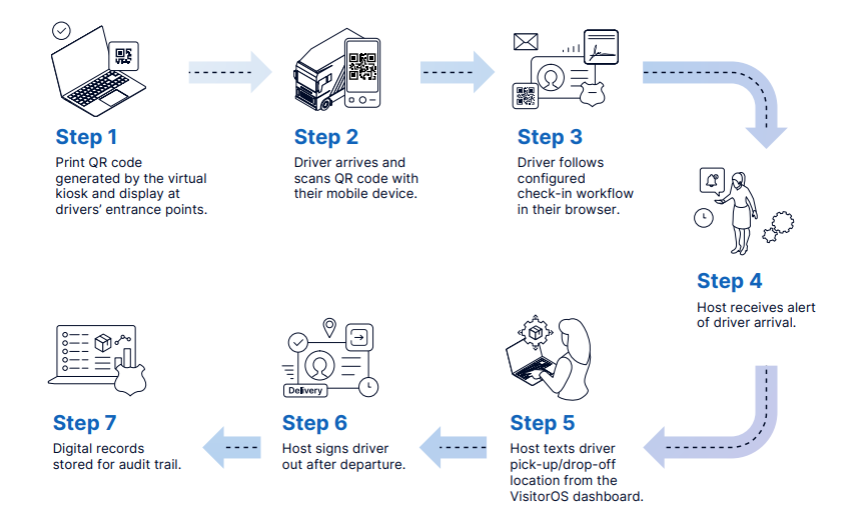
A static QR code is printed and displayed at the driver entry point, whether that is a gate, a guard shack window, a dock entrance, or a remote field location. When a driver arrives, they scan the code with their mobile device and complete the full check-in flow from the cab: entering their name, PO number, trailer number, and contact details; reviewing and signing required documents; and completing any required photo capture or credential verification. This method works well for facilities where drivers arrive at multiple gates, remote entry points, or locations without a staffed desk. No hardware is needed at the entry point beyond a printed or displayed static QR code, making it well-suited for distributed access points and outdoor environments.
Once check-in is complete, the transport team receives a real-time notification with the driver's details. The host can then send SMS instructions directly from the VisitorOS dashboard, directing the driver to the correct dock, gate, or holding area without radio calls or intercom coordination.
iPad Kiosk: Fixed Check-In Point at the Driver Entry
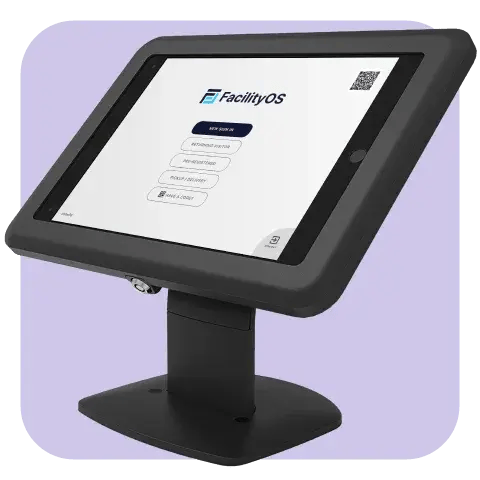
For facilities with a defined driver entry point, such as a driver cage at a loading dock, a gatehouse, or a receiving area, an iPad kiosk can be stationed directly at that location either mounted to a flat wall or on a horizontal surface. Drivers pull up, complete check-in on the screen, and receive their badge before proceeding.
This option provides a consistent physical check-in point with the same guided workflow: identity capture, document signing, PO and trailer entry, and badge printing. It supports facilities where drivers may not have a mobile device readily available, or where a fixed kiosk fits the entry point layout better than a QR code flow.
Both methods feed into the same centralized VisitorOS dashboard. Driver records, compliance documents, arrival and departure times, and badge assignments are stored in one place regardless of which check-in method was used.
What VisitorOS Captures at Driver Check-In

The check-in workflow is configurable by driver type. A recurring common carrier moves through a shorter flow than a first-time HAZMAT transporter. Fields and documents are assigned per driver category and apply automatically at check-in. Common capture elements include:
- Driver name and contact information
- Commercial driver's license (CDL) scan
- Purchase order (PO) number
- Trailer number and carrier company
- Photo capture
- Safety acknowledgments and site-specific compliance documents
- HAZMAT or Transportation of Dangerous Goods (TDG) credentials where applicable
- Watchlist screening
- Badge assignment (digital or printed)
Of these, the CDL scan and HAZMAT or TDG credentials carry the most weight in a compliance review. The CDL links a government-issued photo ID to the visit record; credential verification confirms the driver is authorized to transport regulated materials before a badge is issued.
For facilities in heavy industry, utilities, mining, or regulated manufacturing, the system can be configured to require current credentials on the day of each visit, not just at initial registration, producing timestamped records that document validity at the time of arrival.
Who Benefits From a Visitor Management Driver Check-In Workflow?
Driver check-in affects several roles across a facility. What follows is how VisitorOS addresses the specific concern each role brings to the process.
Truck Drivers
For drivers, time at the gate is time off the road. Stepping out of the cab to press a buzzer, fill out a paper form, or wait for someone to locate the right dock clerk is a routine inconvenience that adds up across multiple stops per day.
The check-in flow is self-directed and takes under three minutes for a first-time arrival. For recurring carriers, prior records shorten it to under two minutes. For pre-registered drivers, the process is shorter still: they arrive with a QR code already generated and move through without re-entering any details.
VisitorOS also supports multiple languages, which matters at industrial facilities where driver populations include speakers of Spanish, French, and other languages. Completing a HAZMAT acknowledgment in a language the driver reads affects whether it holds up as an informed consent.
Logistics & Transport Managers
For logistics and transport managers, the challenge is knowing what is happening at the gate in real time. A driver who completes check-in but does not reach the right dock for 20 minutes represents a gap in visibility that paper logs and radio calls cannot close reliably.
Because dock windows can be assigned against actual check-in times rather than estimated arrivals, real-time visibility directly reduces idle time from early, late, or out-of-sequence trucks. When a carrier disputes a gate delay or a facility challenges a detention fee, the VisitorOS record shows the precise check-in time, dock assignment, and sign-out time — a level of specificity that paper logs cannot match.
Facilities & Operations Managers
For facilities managers, the driver entry point is often the highest-traffic, most inconsistently managed access point on the property. Staffing levels at the guard shack vary. Paper forms change. Recurring carriers start bypassing check-in entirely because the process is slow and no one is consistently enforcing it.
VisitorOS applies the same check-in requirements to every driver arrival, regardless of who is staffing the gate or what time the truck arrives. For multi-gate facilities, every entry point feeds into one dashboard. When a new carrier is added or a required document is updated, the change is made once in the backend and applies across all locations immediately.
For facilities with narrow entry lanes or high delivery volumes, the reduction in physical congestion from driver-based check-in matters as much as the documentation benefits.

EHS Managers
For EHS managers, the driver entry point is where safety compliance either holds or breaks down. A driver who bypasses safety acknowledgment because the gate is busy is a gap in documentation that shows up during regulatory audits or incident investigations.
VisitorOS enforces safety requirements before the driver proceeds — no badge is issued until required steps are complete. For facilities subject to DOT, OSHA, or PHMSA oversight, timestamped records confirm that credentials and training were current on the day of each visit, not just at initial registration, which is the standard auditors apply.
Security Teams
For security teams, the concern at a driver entry point is the same as at the main lobby: every person on-site should be identified, logged, and badged. At a busy loading dock with high truck turnover, that standard is harder to maintain manually.
Because identification is digitally captured (through ID scanning orphoto capture) at the point of entry rather than self-reported on a paper form, the record proves who was on-site. When a theft, damage, or access dispute occurs at a loading dock, the real-time visitor records provides driver, arrival time, and departure.
Industry-Specific Considerations
Heavy Industry & Utilities
At tank farms, refineries, substations, mines, and waste facilities, driver check-in operates in conditions that standard lobby kiosks are not designed for: outdoor environments, remote locations, variable connectivity, and high-risk cargo. Weatherproof signs with static QR codes are best for outdoor gate installations, and offline check-in handles connectivity gaps at remote entry points. For multi-gate properties, all entry points feed into one view, so security and operations teams monitor driver activity across the full site without coordinating separate logs.
Food & Pharmaceutical Manufacturing
Food and pharmaceutical manufacturers face specific documentation requirements for driver and contractor arrivals: hygiene acknowledgments, sanitation protocols, and supplier compliance documentation. VisitorOS configures these into the driver check-in flow by driver type. For facilities pursuing or maintaining SQF, FSMA, FDA, or GMP certifications, timestamped digital records of completed acknowledgments are retrievable on demand for audits.

Real-World Story: Litehouse Inc.
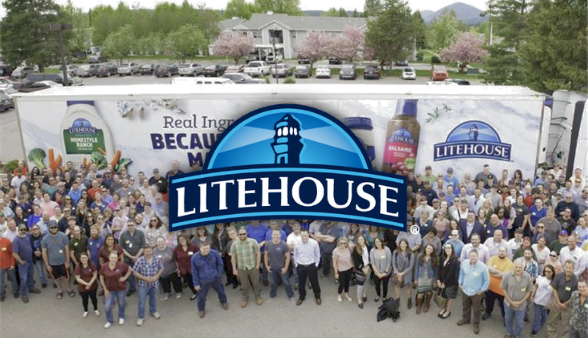
Litehouse Inc. is a food manufacturer headquartered in Sandpoint, Idaho, operating facilities in Michigan, Utah, and Virginia. The company found an opportunity to enhance their visitor management process including how their truck drivers check-in. Before VisitorOS, the process ran on paper logs and manual dock interactions, slowing dock access and leaving compliance documentation fragmented across HR, safety, and operations.
"Documentation was dispersed across HR, safety, and operations." — Taylor Martin, Change Management Analyst, Litehouse Inc.
During platform evaluation, Litehouse prioritized credential verification, badge tracking, and notifications as non-negotiable requirements. Competing solutions could not deliver those capabilities at the right price point. A proof of concept confirmed VisitorOS handled their visitor management and driver check-in requirements.
"FacilityOS hit the sweet spot between functionality and cost." — Taylor Martin, Change Management Analyst, Litehouse Inc.
After deployment, in addition to the entry points for visitors and contractors, for drivers there was a dedicated dock kiosk at dock access to let drivers check in independently and easily. Dock access accelerated, supervisors gained real-time visibility into arrivals, and driver compliance records became centralized and searchable across all locations.
Frequently Asked Questions:
Can drivers check in without stepping out of the truck?
Yes. The virtual kiosk method uses a QR code displayed at the entry point. Drivers scan it from their mobile device and complete the full check-in flow — PO and trailer details, required acknowledgments, and photo submission — without leaving their vehicle. For facilities that prefer a fixed check-in point, an iPad kiosk at the driver entrance covers the same workflow.
What information does VisitorOS capture at driver check-in?
The workflow is configurable by driver type and facility requirements. It can capture name and contact information, commercial driver's license, PO number, trailer number, carrier company, photo, safety acknowledgments, HAZMAT or TDG credentials, and watchlist screening results. Each driver type can have a different required set.
How does VisitorOS handle recurring carriers versus first-time drivers?
Recurring carriers move through a shorter flow because prior records are already on file through the Returning Visitor Visitor feature on VisitorOS. First-time or high-risk driver categories, such as HAZMAT transporters or contractors entering restricted areas, complete a more comprehensive flow that includes full credential capture and safety document signing. Both flows are configured once and apply automatically at every check-in.
How are transport teams notified when a driver arrives?
When a driver completes check-in, VisitorOS sends a real-time notification to the designated host or transport team by email, SMS, or through integrations with Slack, Microsoft Teams, or Outlook. The notification includes the driver's name, PO number, and trailer number. Hosts can then send the driver direct SMS instructions from the dashboard.
What happens if a driver forgets to check out?
VisitorOS sends automatic sign-out reminders to the transport team if a driver has not been signed out after a set period. This keeps departure records complete without requiring gate or dock staff to track active drivers manually.
Does VisitorOS work at remote gates or locations with limited connectivity?
Yes. VisitorOS supports offline check-in for locations where connectivity is intermittent. Arrivals are recorded locally and uploaded automatically once the connection is restored. This is specifically relevant for remote industrial facilities, outdoor gates at mines or substations, and multi-gate operations where connectivity is inconsistent across locations.
This page provides general information about VisitorOS driver check-in capabilities and is not a substitute for a formal evaluation. Contact FacilityOS for specifics on plans, configuration options, and hardware availability for your facility.
Request a demo to walk through the driver check-in flow, compliance document capture, real-time notifications, and how VisitorOS configures for your specific entry point setup.
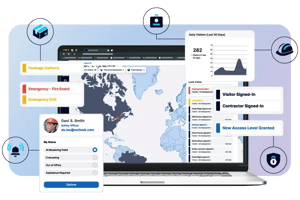 Streamline Driver Check-In at Your Facility
For facilities evaluating whether their current process holds up at volume and at audit time, a live demo is the fastest way to see the difference.