
Many EHS managers at plants, hospitals, and campuses think of OSHA's multi-employer citation policy as a construction rule. The directive reads differently. OSHA's Multi-Employer Citation Policy (CPL 02-00-124) applies "in all industry sectors," and one of its first examples involves a factory that hired an outside company to service its machinery.
For a host facility, the useful question is what OSHA expects once contractors are working on site. The answer is reasonable care, and much of a host's evidence of reasonable care is a record: what it knew about each contractor, how it corrected problems, and how it responded when they recurred. Contractor compliance software keeps part of that record. This article covers each element of reasonable care, where software supports it, and where the judgment stays with the EHS team.
This article is educational content and is not legal advice.
When Is a Host Facility a Controlling Employer?
A host facility is a controlling employer when it has general supervisory authority over the worksite, including the power to correct safety and health violations itself or require others to correct them. OSHA's directive says that authority can come from a contract or, where the contract is silent, from how the host exercises control day to day.
A facility can meet that definition without describing itself that way. A plant that writes safety requirements into its contractor agreements, assigns staff to direct contractor work, or can halt a job it considers unsafe holds the kind of control the directive describes.
The policy also allows OSHA to cite a host for a hazard that exposed only another employer's workers. In the directive's Example 1, a factory left chemical drums uncovered after a maintenance contractor asked the factory to cover them, and the factory was citable even though every exposed worker belonged to the contractor. That reach is why the standard of reasonable care carries so much weight for host facilities.
What Does OSHA Look for in a Reasonable Care Program?
OSHA evaluates a controlling employer's reasonable care on three points: whether it conducted periodic inspections at an appropriate frequency, whether it had an effective system for promptly correcting hazards, and whether it enforced compliance through a graduated system of enforcement and follow-up inspections.
The expected level of oversight scales with risk. The directive ties inspection frequency to the scale of the work, how quickly hazards change, and how much the host knows about the contractor's safety history and practices. A contractor with a record of non-compliance, or one the host has never worked with, warrants closer attention, especially early in the job.
The bar sits below the one a host applies to its own employees. A controlling employer is not normally expected to inspect as often as the contractor or to match its trade expertise. What OSHA looks for is a working system, and a working system leaves records behind. The table below summarizes how software and people divide that work, and the sections that follow cover each element.
| What OSHA examines | What software records | What the EHS team decides |
|---|---|---|
| Inspection frequency, based partly on what the host knows about the contractor | Credentials, insurance, training records, and safety documents collected and tracked before arrival | Whether the contractor works safely, and how often to inspect |
| Prompt correction of hazards | Expiry alerts and pre-visit compliance checks that surface lapsed or missing documents | How to find and correct hazards in the work itself |
| Graduated enforcement and follow-up | Each contractor's compliance status over time and, when contractor compliance and visitor management are connected, every check-in attempt, including whether the site approved or denied a flagged one | Whether a pattern in those records points to a problem, and what consequence fits it |
| Evidence of all three | Timestamped reviews, approvals, and site visits | What inspections found and how the team responded |

How Does Software Support Knowing Your Contractors?
Contractor compliance software supports this element by gathering what a host knows about each contractor into one record before the contractor arrives on site. That record feeds the decision OSHA ties most closely to reasonable care: how closely to watch a given contractor.
The directive links inspection frequency to the host's knowledge of a contractor's safety history and practices. Facilities typically build that knowledge from documents such as certificates of insurance, trade licenses, training records, and safety statistics. When those documents arrive by email and live in spreadsheets, information about any one contractor sits in several places, and a lapsed credential can go unnoticed until someone looks.
Software Changes Where That Information Lives
Each site can define its own requirements, contractors and vendors submit documents against those requirements before arrival, and the team reviews and approves them in one place. Some systems also use AI to read uploaded certificates and extract fields such as expiry dates, coverage amounts, and certificate numbers for a reviewer to confirm. Tracking compliance for each individual worker, rather than only at the vendor level, matters because the person who arrives on a given day may not be the person whose credentials the team reviewed.
The Judgment Stays with the EHS team
A complete file shows that a contractor met paper requirements, while only observation on the floor shows whether that contractor works safely. The record informs how often to inspect, and the team still sets that frequency.

How Does Contractor Compliance Management Software Support Prompt Correction?
Contractor compliance software supports prompt correction on the administrative side. OSHA's directive asks whether the controlling employer had an effective system for promptly correcting hazards. A lapsed credential is not a hazard on its own, but it can mean an untrained or uninsured worker may be heading to the site, and software can surface that gap before the contractor arrives.
Expiration tracking is a direct example, as reminders go to contractors and vendors before a document lapses, and the contractor's status changes when a document expires, so the team sees the gap without searching for it. When contractor compliance connects to visitor scheduling, software can also check compliance when a host schedules a visit and flag an out-of-compliance contractor to the people who can resolve the issue, which gives everyone time to fix it before the arrival date.
Hazards in the work itself remain outside what a document system can see. A missing guardrail or an untested lockout surfaces through inspection and reporting, and the correction depends on the people walking the site.
How Does Contractor Compliance Software Support Graduated Enforcement?
Graduated enforcement, as the directive describes it, means escalating consequences when a contractor keeps violating safety standards. Software supports part of that work by keeping a record of each contractor's compliance status and check-in history, which the EHS team can review alongside what its inspections find.
The directive's own examples show why enforcement carries so much weight.
Example 6: In Example 6, a host had worked with a sandblasting contractor for years, inspected weekly, reviewed the contractor's own inspection reports, and applied graduated enforcement. When a respirator violation occurred between inspections, the directive concluded that the host had exercised reasonable care and was not citable.
Example 7: In Example 7, a general contractor found the same fall protection violations on repeated inspections and pointed them out each time without taking further action. The directive treats that contractor as citable because it lacked a graduated system of enforcement.
Contractor compliance management software can also bring consistency to the point of entry, provided contractor compliance and visitor sign-in run in connected systems. When they are separate, nothing links a contractor's compliance status to the sign-in kiosk. When they are connected, the sign-in system rechecks compliance as the contractor arrives and catches anything that changed since scheduling. For a contractor who no longer meets site requirements, the system (such as FacilityOS) can send an approve-or-deny requests to the site before they can check-in, so a person makes the call and the system records the decision.
A contractor flagged as non-compliant at sign-in on the last few scheduled work days, or one whose ID failed validation at the kiosk, gives the team something to investigate. So does a run of site approvals for a contractor the system keeps flagging, since each approval is a decision someone made to let a non-compliant contractor in.
What the team concludes is its call. The same pattern might lead to a conversation with the vendor, a suspension, or removal from the approved list, and the team still has to connect these records to the safety violations its inspections turn up.
How Does Contractor Compliance Software Help Show Reasonable Care After an Incident?
After an incident, the question becomes what the host can show. Compliance software supports this by keeping a timestamped record of what the team verified, who verified it, and what action followed, built up as the work happens rather than reconstructed afterward.
A record has limits worth stating plainly. It documents diligence, and it does not transfer the host's liability to the contractor or to a software vendor. An indemnification clause in a contractor agreement can shift costs between companies, but it does not change whether OSHA can cite the host. The financial exposure is real: OSHA's maximum penalties are $16,550 per serious violation and $165,514 per willful or repeated violation, figures that stayed in place for 2026 after OSHA cancelled the annual inflation adjustment.
What Should Contractor Compliance Software Include to Support Reasonable Care?
Contractor compliance software supports reasonable care when it covers the full path from a contractor's first document upload to sign-in at the site. The capabilities below are a selection of those that map to the elements OSHA examines, starting with the one that connects the record to the front door.
Visitor Management Integration
Contractor compliance and visitor management often run as separate systems, which leaves the kiosk with no view of a contractor's compliance status. When the two connect, the compliance record follows the contractor to the door:
- At scheduling: the system checks compliance as a host invites each contractor, so gaps reach the people who can resolve them before the visit.
- At sign-in: the system rechecks compliance as the contractor arrives and catches anything that changed since scheduling.
- After each attempt: the contractor's record gains every check-in attempt, including flagged attempts and whether the site approved or denied them.
Other Capabilities That Support Reasonable Care
| Capability | Element it supports | Why it matters |
|---|---|---|
| Site-specific requirements | Inspection frequency | Each site defines what contractors submit, matched to its own hazards and regulations |
| Individual contractor tracking | Inspection frequency | The worker who arrives may not be the one whose credentials the team reviewed at the vendor level |
| AI-assisted document review | Inspection frequency | AI reads certificates and extracts fields such as expiry dates, while the team keeps the approval decision |
| Expiration tracking and alerts | Prompt correction | Lapsed documents surface before the contractor arrives |
| Approval workflows for flagged contractors | Graduated enforcement | A person decides each exception, and the system records the decision |
| Timestamped audit trail | Evidence of all three | The record shows what the team verified, who verified it, and when |
| Multi-site visibility | All three | Corporate EHS can set common requirements while each site adds its own |
Recommended Tech: FacilityOS's ContractorOS & VisitorOS Modules
FacilityOS offers contractor compliance management and visitor management on one platform, so the capabilities above run as one connected workflow.
ContractorOS: Contractor Compliance Management
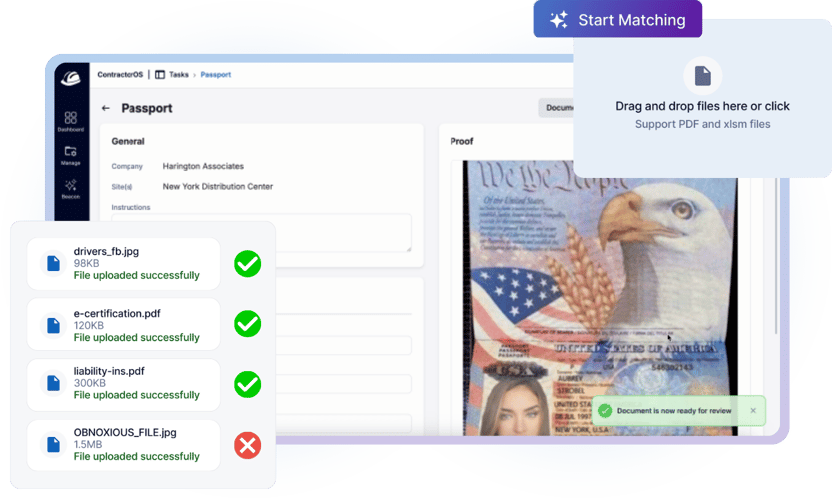
ContractorOS is the system of record for contractor and vendor compliance.
- Document collection: contractors and vendors submit documents against site-specific requirements, and ContractorOS tracks compliance for each vendor and each individual contractor.
- AI Compliance Assistant: Beacon AI, the AI engine built into FacilityOS, reads batches of uploaded documents, matches each one to the open compliance task it satisfies, and extracts expiry dates, coverage amounts, and certificate numbers. The team reviews and approves every match.
- Expiration tracking: automated reminders reach contractors and vendors before documents lapse.
- Audit trail: ContractorOS logs every submission, approval, and action, and Task History shows who reviewed and who approved each item.
VisitorOS: Visitor Management
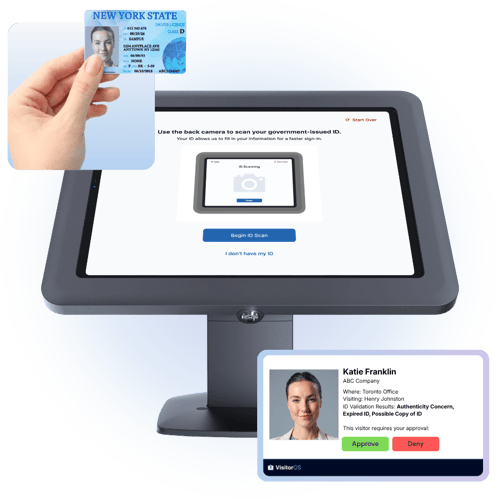 VisitorOS handles contractor sign-in at the site.
- Compliance check at sign-in: VisitorOS rechecks each contractor's ContractorOS status at the kiosk.
- Approval workflow: for a contractor who does not meet requirements, VisitorOS sends an approve-or-deny request to the site.
- ID validation: VisitorOS checks scanned IDs at the kiosk and flags IDs that fail validation.
- Sign-in logs: VisitorOS records every contractor sign-in and sign-out.
How ContractorOS & VisitorOS Work Together
- Invite: A host creates a VisitorOS event and invites contractors from ContractorOS. The system checks compliance as the host adds each contractor and notifies the people who can resolve any gap.
- Arrive: VisitorOS rechecks each contractor's status at sign-in.
- Decide: VisitorOS approves compliant contractors for check-in and sends an approve-or-deny request to the site for anyone who is not compliant.
- Record: The outcome joins the contractor's history, and EmergencyOS adds contractors approved through VisitorOS to its mustering lists for headcounts during an evacuation.
Key Takeaways
- OSHA's Multi-Employer Citation Policy applies in all industry sectors, so OSHA can cite a plant, hospital, or campus with authority over contractor work as a controlling employer.
- OSHA judges a controlling employer's reasonable care by its inspection frequency, its system for promptly correcting hazards, and its graduated system of enforcement and follow-up.
- Contractor compliance software supports reasonable care by keeping a dated record of what the host knew, how it enforced its requirements, and how it responded to lapses.
- Software does not inspect contractor work or transfer liability, so the judgment calls on inspection frequency and consequences stay with the EHS team.
See how ContractorOS and VisitorOS check contractor compliance from invitation to sign-in
Stay updated with industry insights, success stories, and more. Follow us on social media for the latest FacilityOS content.
 Follow us on Facebook
  Follow us on X
 Follow us on LinkedIn