
A visitor management system is a digital solution that automates how an organization registers, screens, tracks, and reports on everyone who enters its facilities. For multi-site EHS and facilities teams, it connects front-desk activity to security, compliance, and emergency readiness within a single record.
The category has grown well past a sign-in sheet at reception. The system that checks a guest in now feeds security screening, compliance documentation, and the live count of who is on site during an emergency. That shift raises a practical question for anyone evaluating options: which features actually matter, and which are extras.
The list below reflects what we hear from the EHS, security, and facilities teams we work with every day. Across years of conversations with customers managing visitor access at single sites and large multi-site operations, the same capabilities surface as the ones that decide whether a system gets used or quietly bypassed. These are the features we point teams toward first.
1. Pre-Registration & Pre-Arrival Invitations
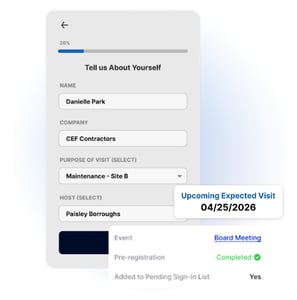 Pre-registration lets hosts invite guests ahead of time and collect visitor details, documents, and consent before anyone arrives, often paired with a QR code the visitor uses to confirm arrival in seconds.
It is one of the first capabilities our customers point to, because it moves data collection and screening to before the visit rather than during it. That shift keeps entry points clear during busy periods and gives security and EHS teams time to review who is coming, flag concerns, and confirm required documents are complete before a guest reaches the door. Hosts and front-desk staff gain faster processing, while EHS and security managers gain advance visibility into the day's expected arrivals.
In regulated environments, pre-registration is where consent and data-minimization obligations begin. Collecting visitor information digitally supports privacy frameworks such as GDPR and CCPA, and gathering citizenship or nationality details in advance helps facilities subject to export controls (ITAR and EAR) screen foreign-national access before arrival.
Tech Tip! What to Look For: Pre-registration that captures only a name and emails a confirmation clears a low bar. When looking for a visitor management solution, shortlist systems that let you build custom fields by visitor type, require documents and training before arrival, pre-screen against watchlists, and give administrators a live visitor list they can adjust on the fly.
2. Self-Service Check-In on Kiosk & Mobile
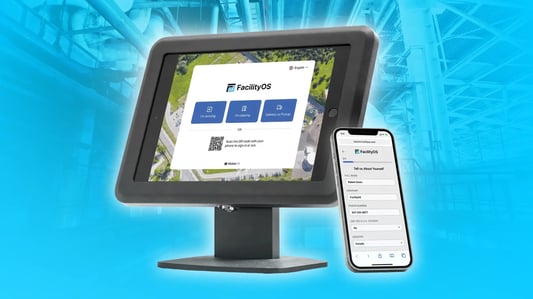
Self-service check-in shifts sign-in from a staffed desk to a kiosk, tablet, or the visitor's own mobile phone, guiding them through the exact steps a site requires.
It standardizes the front-desk process and produces a complete, consistent record for every visit without relying on a receptionist to manually capture each detail. Facilities with limited reception coverage or high visitor volume see the clearest effect on wait times, and receptionists gain time back for work that needs a person. Visitors benefit from a faster, more predictable arrival.
The compliance value comes from consistency: a guided flow means every guest completes the same required questions, acknowledgments, and document steps, which keeps records audit-ready. Kiosk deployments in public-facing facilities also intersect with accessibility expectations such as the ADA, so screen design and alternative input options matter.
Tech Tip! What to Look For: Any kiosk can record a name and ping a host. The stronger options adapt the flow to each visitor type, branch into ID capture, document signing, and screening, support both kiosk and mobile entry, and sync every check-in to one cloud record across devices and sites.
3. Automated Host Notifications
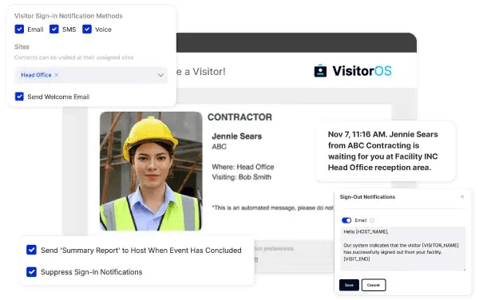 When a visitor or contractor checks-in, the visitor management system alerts the host automatically through channels such as SMS, email, Slack, or Microsoft Teams.
In our experience, the moment between arrival and greeting is where lobbies back up and unescorted visitors wait unattended. Automatic alerts close that gap and remove the manual work of phoning or paging employees. Hosts gain prompt greetings, the front desk personnel gain fewer interruptions, and security gains value when the same engine routes watchlist or exception alerts to the right people.
Notifications are rarely named in regulation directly, but they support duty-of-care and escort obligations in settings where visitors cannot move through a facility unaccompanied, such as CFATS-covered chemical sites or controlled manufacturing areas.
Tech Tip! What to Look For: Avoid limited systems that only provide a single email to a single host. Press vendors on multi-channel delivery, per-host preferences, catch-all and backup contacts for missed alerts, sign-out reminders, and instant escalation when a watchlist hit occurs.

4. Identity Verification: ID Scanning & Photo Capture
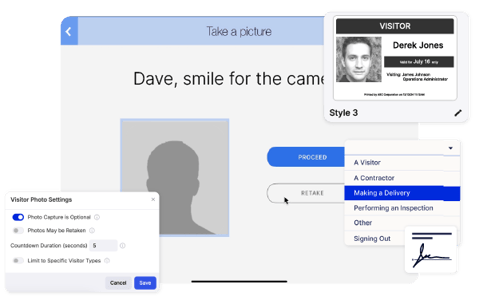
Identity verification confirms that a visitor or contractor is who they claim to be, typically by scanning a government ID such as a driver's license, passport, or Green Card and capturing a photo at check-in.
A name written on a sign-in sheet offers limited accountability. ID scanning and a photo create a reliable record tied to each visit, which supports investigations, audits, and access decisions. Security and compliance teams benefit most, and the value rises sharply in higher-security environments.
This feature carries direct regulatory weight in several industries. For example, regulatory-controlled facilities under ITAR and EAR verify nationality before granting access, C-TPAT requires a documented process for identifying and mitigating risk in the international supply chain for goods entering the US which includes ID scanning of driver's entering your facility, and any system that captures facial images intersects with biometric privacy laws such as Illinois BIPA and the data-handling rules in GDPR.
Tech Tip! What to Look For: Typing a name into a field is not verification. Confirm that the visitor management system scans and parses the ID, captures and stores a photo under rules you set, lets you choose which fields to keep or ignore, and provides the option to purge data automatically to meet retention limits.
5. Visitor Badges & Visual Identification
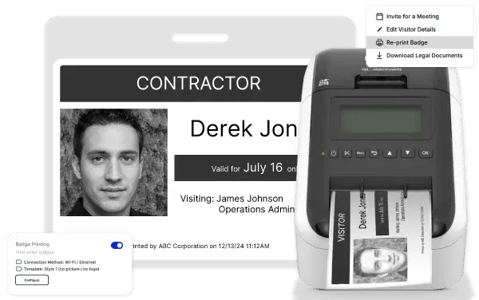 Visitor badges make on-site guests, visitors and contractors easy to identify at a glance, usually showing a photo, host name, validity date, and approved access areas.
Visible identification lets any employee distinguish an approved visitor from someone who has not signed-in, which is the practical front line of physical security. Security and compliance officers gain at-a-glance verification, hosts gain smoother movement through the building, and visitors benefit from a badge that can also carry useful details such as Wi-Fi access.
Badging also can connect to access-control and escort regimes in regulated settings, including TWIC-governed maritime facilities, CFATS chemical sites, and government facilities where color-coded or zone-restricted badges enforce where a visitor may go.
Tech Tip! What to Look For: A visitor management system that provides more than a simple badge with a name on it. Look for systems that include photo badges, custom badge templates by visitor type, color coding, badge expiration, and reusable multi-day badges, in monochrome or full color.
6. Digital Document Signing & Safety Training
.webp?width=547&height=300&name=VOS-safety-training-img%20(1).webp) Many facilities require visitors and contractors to sign NDAs, safety waivers, or health declarations, or to complete a short safety briefing, before entry. Handling these digitally keeps each document attached to the visitor record and confirms completion before access is granted.
Many facilities require visitors and contractors to sign NDAs, safety waivers, or health declarations, or to complete a short safety briefing, before entry. Handling these digitally keeps each document attached to the visitor record and confirms completion before access is granted.
Paper acknowledgments are hard to track, easy to lose, and difficult to produce during an audit. Digital workflows confirm that the right documents are completed by the right visitor type at the right time. EHS managers and administrators benefit most, gaining confidence that everyone entering a high-risk area has acknowledged the relevant protocols.
It simplifies staying compliant with regulations as it streamlines the process and keeps the records centralized in one place. For instance, OSHA expects contractors and visitors entering hazardous areas to receive site-specific safety information, ISO 45001 addresses controls for non-employees on site, NDAs protect intellectual property in R&D and manufacturing, and pharmaceutical settings governed by 21 CFR Part 11 require validated electronic signatures and records, and GMP regulated facilities require visitors to acknowledge GMP documentation prior to entry.
Tech Tip! What to Look For: A single static waiver does little on its own. Consider a visitor management system where the documents can be tailored by visitor type, enables enforced re-acknowledgment cadences (for example every six months), automatically stores signed copies on the visitor log, and includes uploaded videos or quizzes for safety training when a visitor or contractor sign-ins.
Related Content: Safety Training, Document Signing, NDAs & Visitor Management Systems: Best Practices & Insights
7. Visitor Screening & Watchlists
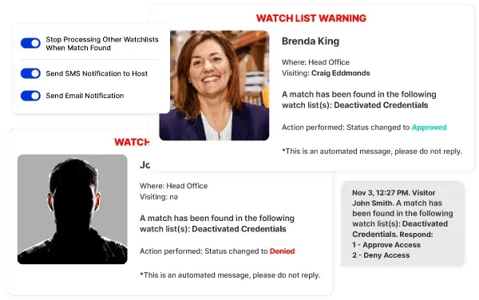 Screening checks each visitor and contractor against custom lists, site requirements, and/or watchlists, whether drawn from third-party databases or built internally, and when it finds a match it sends a notification to security or the host to approve or deny that visitor's entry to the site.
It converts screening from a manual judgment call into a consistent, documented step that runs on every visit. When a match occurs, the system can alert security in real-time so the team responds before access is granted. Security personnel and facility managers benefit most, gaining a repeatable control that does not depend on a receptionist recognizing a name.
Watchlist screening maps closely to specific compliance regimes. Export-control and trade rules call for screening against denied-party lists such as the OFAC SDN list and the BIS Denied Persons List, and CFATS personnel-surety provisions call for vetting individuals with access to high-risk chemical facilities. Internal watchlists also support trespass enforcement and workplace-violence prevention programs.
Tech Tip! What to Look For: Manually checking internal lists or searching through public databases can take up a lot of time. Favour systems that integrate third-party and custom lists, screen automatically at both pre-registration and check-in, tailored approval workflows, and alert the right people instantly.

8. Configurable Workflows & Visitor Approvals
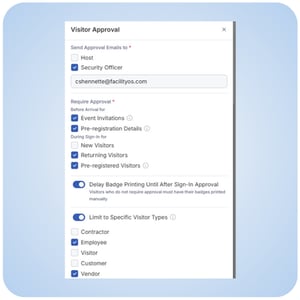 Configurable workflows let administrators set different requirements by visitor category, department, or site, while approval steps give hosts or security the option to review and approve or deny a visit before or at arrival.
A single rigid process either over-burdens low-risk guests or under-screens high-risk ones. Tailored flows apply the right requirements to each visitor type, such as an NDA for vendors or a safety briefing and escort for contractors. Administrators and security teams gain precise control, and visitors benefit from a process that asks only for what their visit requires.
This capability underpins the least-privilege access principles found in ISO 27001 and supports tiered access in regulated facilities, where contractors, auditors, and government inspectors each follow distinct entry requirements.
Tech Tip! What to Look For: Seek visitor management systems that enable you to tailor the sign-in workflow based on site requirements, location requirements, regulations, and security requirements. This enables your site to enhance security, safety, and operational measures to your visitor management program while staying compliant. Ask a vendor about their tailored workflow options to see what works best for you.
9. Sign-Out Tracking & Real-Time On-Site Awareness
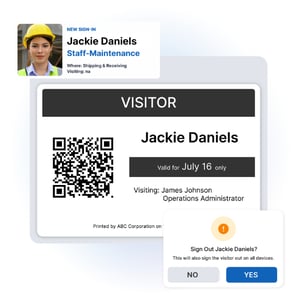 Sign-out tracking records when visitors leave through kiosk, mobile, or automatic sign-out, keeping the on-site roster accurate throughout the day.
An arrival-only record drifts out of date within hours and cannot answer the question that counts most in an incident: who is still in the building. A reliable live count supports daily operations, occupancy management, and emergency response. Security teams, EHS managers, and reception all rely on it, and hosts gain accountability for their own guests.
The strongest regulatory tie is life safety. OSHA emergency action plans under 29 CFR 1910.38 and the NFPA 101 Life Safety Code expect facilities to account for everyone on site during an evacuation, and an accurate visitor roster is part of meeting that expectation.
Tech Tips! What to Look For: Prioritize a system that provides a kiosk and mobile sign-out, automatic sign-out rules, host and visitor reminders, and alerts for guests who overstay their expected duration.
10. Emergency Evacuation Readiness
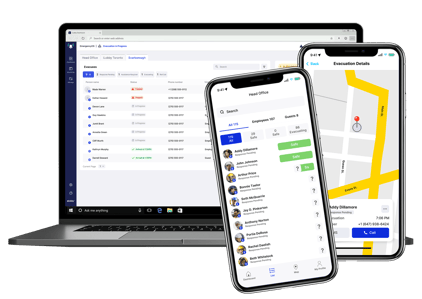 During a fire alarm or other emergency, evacuation leads need an accurate, mobile-accessible list of everyone on site, including visitors and contractors.
In our conversations with customers, teams treat emergency awareness as a core requirement to visibility of visitors and contractors onsite. Integrating a visitor management system with your emergency system includes visitors and contractors in your emergency evacuation process and communications, not just employees. Including visitors in the real-time roll calls and digital mustering lets safety officers account for all on-site personnel quickly and direct help where it is needed. EHS managers, safety officers, and security teams benefit most, and the wider workforce benefits from a faster, more reliable headcount.
Integration with emergency management systems is a highly recommended feature for visitor management solutions as it helps support regulations while keeping visitors safe. For example, OSHA emergency action plans (29 CFR 1910.38), the NFPA 101 Life Safety Code, and many local fire codes expect facilities to account for all occupants during an evacuation including visitors. Visitor data feeds directly into that obligation.
Tech Tip! What to Look For: Consider a visitor management system that seamlessly integrates with a digital emergency management system and provides a real-time roster with visitors included. A platform that has both visitor management and emergency management solutions that can natively connect with one another is preferred because they live on the same system.
11. Compliance, Audit Trails, & Data Privacy
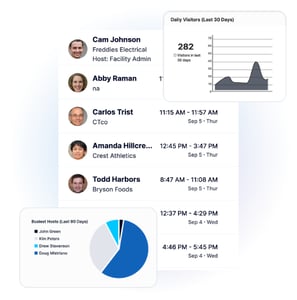 A complete visitor record, with timestamps, signed documents, and visitor types, creates an audit trail, while encrypted storage, role-based access, and configurable retention govern how that data is handled.
Visitor data is both a compliance asset and a privacy liability. A thorough, searchable record shortens audit preparation and demonstrates control, while retention limits and access restrictions keep the same data from becoming a risk.
Tech Tip! What to Look For: Seek a structured audit trail tied to documents and timestamps, role-based access, scheduled reporting, and configurable retention and purging that maps to obligations such as GDPR.

12. Multi-Location Management with Centralized Dashboards & Reporting
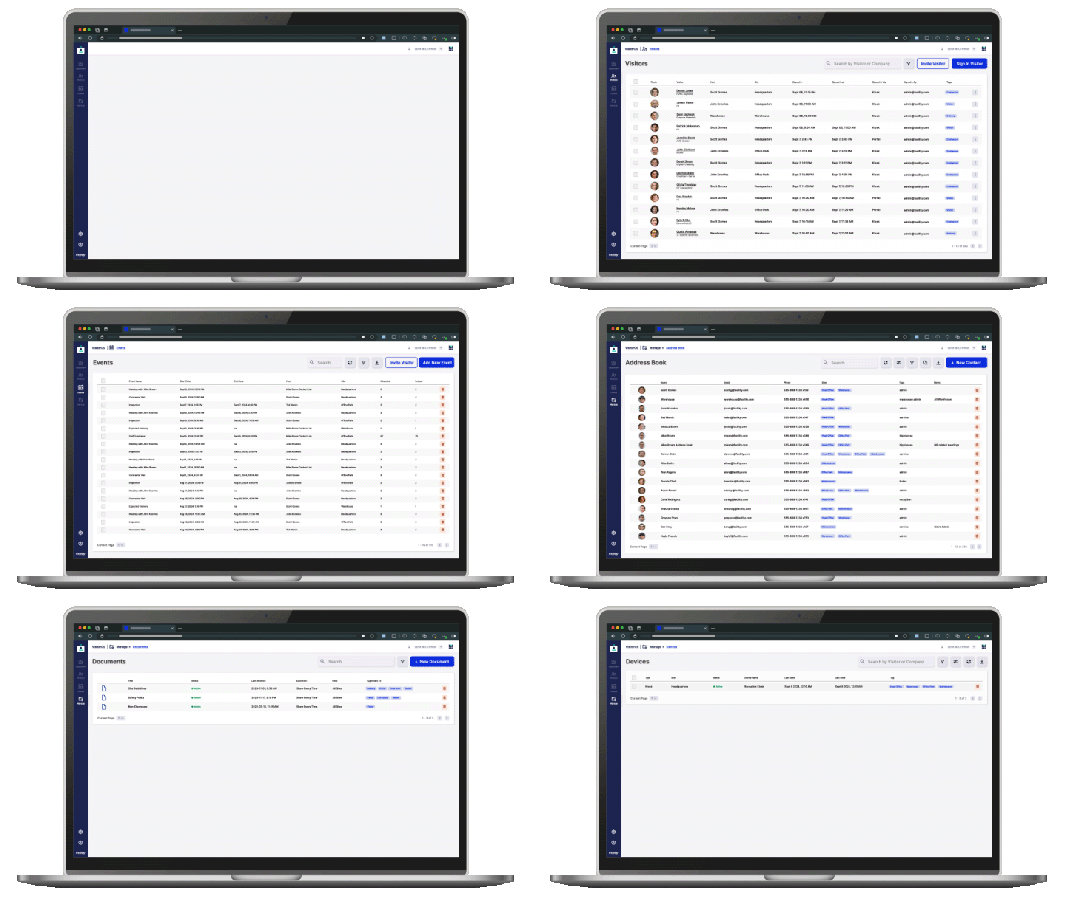 Multi-location management pairs centralized administration with site-level configuration, surfaced through a single dashboard that shows current visitors, expected arrivals, and pending approvals across locations.
Consistency is difficult to maintain when each site runs its own process. Centralized governance lets an organization apply the same standards everywhere while still allowing each site to configure what it needs. Security leaders, facilities teams, and upper management gain shared visibility and comparable data across the portfolio.
For multi-site enterprises, this is also where compliance becomes manageable at scale: uniform screening, documentation, and retention across locations support consistent adherence to standards such as ISO 45001 and ISO 27001, and centralized reporting simplifies enterprise-wide audits.
Tech Tip! What to Look For: Managing one site at a time does not scale to a portfolio. Look for a single view across all sites, per-site configuration within shared standards, scheduled and exportable reporting, and aggregated analytics on visitor patterns, peak times, and busiest hosts.
How VisitorOS Delivers These Top Visitor Management System Features
VisitorOS is the FacilityOS visitor management system, built for multi-site security and compliance. It covers the full list above within one platform, and it extends two of the requirements, emergency evacuation and contractor compliance, through native integrations with other FacilityOS modules.
Pre-Registration & Self-Service Check-In/Out
VisitorOS pre-registration sends guests an SMS or email link to complete their details and documents in advance, then provides a QR code for fast self check-in /out at an iPad kiosk or from a mobile device.
Automatic Host Notifications
Visitor notifications reach hosts through SMS, email, Slack, and Microsoft Teams the moment a guest signs in, with sign-out reminders and backup contacts for missed alerts.
ID Scanning, Photo Capture, & Custom Badges
ID scanning captures details from a driver's license, passport, or Green Card and records a photo, while badge printing produces photo badges with host name, validity date, and access details.
Automated Safety Training, Documents, & Visitor Screening
NDAs, legal documents, and safety policy acknowledgments are completed at check-in and stored on each visitor's log, with configurable renewal cadences that keep safety and compliance acknowledgments current by visitor type. Watchlist management screens every guest against third-party and custom lists and can deny entry automatically on a match.
Tailored Workflows & Approvals
Administrators configure sign-in flows by visitor type, including approve and deny steps, and VisitorOS supports kiosk, mobile, and automatic sign-out to keep the on-site roster accurate.
Multi-Site Dashboards, Audit-Ready Logs, & Reporting
The centralized dashboard shows current visitors, expected arrivals, and pending approvals across sites, while visitor logs and analytics build a timestamped audit trail with scheduled reporting and configurable data purging for regulations such as GDPR.
Integrated Emergency Management
VisitorOS records who is on site in real-time. For evacuation rosters and emergency communication, it integrates natively with EmergencyOS, the FacilityOS module for emergency and evacuation management. That connection lets responders account for visitors, contractors, and employees during an incident from one live roster.
Turnkey Implementation with Preconfigured Hardware & Software
VisitorOS, eliminates the friction that slows deployments. Every customer receives a fully functional system that arrives ready to use, with hardware, software, and support included as part of their implementation. Devices arrive ready to plug in, with your workflows, branding, and integrations preloaded. An iPad kiosk is included with applicable plans and MDM hardware. Instead of waiting months to go live, customers can get started in hours and move from purchase to first check-in within weeks, without a heavy IT lift.
Stay updated with industry insights, success stories, and more. Follow us on social media for the latest FacilityOS content.
 Follow us on Facebook
  Follow us on X
 Follow us on LinkedIn